Best Help Desk Software in 2026: 12 Tools for Small Teams
On this page
The best help desk software for a small team is the one that covers the channels your customers already use, charges for AI in a way you can predict, and stays affordable as you add the third, sixth and tenth person. For most small teams in 2026 that means a shortlist of Help Scout, Freshdesk, Zendesk, Intercom, Front, Gorgias, a free or open source option, and one of the newer low-cost tools. The right pick depends far more on how you work than on who has the longest feature list.
We read every official pricing page below on October 25, 2026, and only quote what those pages said that day. One disclosure up front: we build Kora Reply, a help desk for small teams, and it appears in this list. We tell you where it falls short too.
How we picked and what "best" means here
A help desk (software that turns customer emails, chats and messages into trackable tickets your team can assign, prioritize and resolve) is now a crowded category. Most "top 10 help desk software" lists rank tools on feature count. That favors enterprise suites and hides the two things that hurt small teams most: channels locked behind higher tiers, and AI fees billed per answer.
So we scored each tool on five questions instead:
- Channels on the entry plan. Can you run email, live chat and a help center without jumping two tiers?
- AI pricing model. Is AI included, metered per outcome, or a separate add-on?
- Free or low-cost entry. Is there a free plan or a plan under $20 per user?
- Fit by team type. Customer support, ecommerce, SaaS or internal IT?
- Verifiable pricing. Does the vendor publish prices, or is it "talk to sales"?
Our rule: a price only appears in this article if the vendor's own pricing page showed it on the day we checked. Prices change often, so treat every number as "as of October 2026" and re-check before you buy.
We left out tools whose prices are not public or could not be read reliably, and tools aimed purely at large enterprises. If you run internal IT support rather than customer support, also read our explainer on help desk vs service desk, because the right category changes the shortlist.
Help desk software comparison table
This table is a quick helpdesk software comparison of entry prices and AI fees. "Annual" means the per-month price when billed yearly.
| Tool | Best for | Entry paid plan (annual) | Free plan | AI pricing model |
|---|---|---|---|---|
| Zendesk | Growing support teams that want depth | Support Team $19 per agent (email and ticketing); Suite Team $55 | No | $1.50 committed or $2.00 pay-as-you-go per automated resolution |
| Freshdesk | Email-first support teams | Growth $19 per agent | No | First 500 Freddy AI Agent sessions included, then $49 per 100 |
| Help Scout | Small teams that live in email | Standard $25 per user | Yes, 5 users | $0.75 per resolution |
| Intercom | Chat-first SaaS products | Essential $29 per seat list ($19 for new customers) | No | $0.99 per Fin outcome |
| Front | Teams that share inboxes across departments | Starter $25 per seat, up to 10 seats | No | Add-ons |
| Gorgias | Ecommerce stores | Basic $50 per month (300 tickets) | No | AI Agent add-on, pay only when it resolves a conversation |
| Jira Service Management | Internal IT and dev teams | Paid tiers per agent | Yes, 3 agents | Not compared |
| ManageEngine ServiceDesk Plus | IT help desks | Paid editions priced per year | Yes, up to 5 technicians | Not compared |
| Spiceworks | Budget IT help desk | Premium $6 per seat | Yes, Core plan | Not compared |
| Chatwoot | Teams that want open source | Startups $19 per agent (billing period not stated) | Yes, 2 agents, 500 conversations | Captain AI credits on paid plans |
| Helpwise | Low-cost shared inbox | Standard $12 per user | No | Not compared |
| LiveAgent | Multichannel on a budget | Starter $15 per agent | No | Included, "never pay per resolution" |
The 12 best help desk tools, reviewed
Below, each tool gets the facts that matter for a buying decision. These are help desk software examples chosen to cover different team types, not a ranking from 1 to 12.
1. Zendesk: best for depth, priced for it
Zendesk is the category reference. Its Support Team plan costs $19 per agent per month paid yearly and covers email and ticketing. AI agents, a knowledge base and messaging start on Suite Team at $55 per agent per month paid yearly. AI is billed per automated resolution. Zendesk's own help article explains that an email resolution is counted after 72 hours of inactivity when the AI reply met its conditions.
Our take: Zendesk is excellent once you have a dedicated support lead. For a team of three, the jump from $19 to $55 per agent for chat and help center is the moment to pause. We compare it in detail on our Zendesk alternative page.
2. Freshdesk: best for email-first teams
Freshdesk Growth is $19 per agent per month billed annually, Pro is $55 and Enterprise $89. Every plan includes the first 500 Freddy AI Agent sessions; additional sessions cost $49 per 100. The pricing page does not say the 500 renew each month, so treat them as a starting allowance that makes the early months of AI cheap to try. See how it stacks up on our Freshdesk comparison.
3. Help Scout: best for small teams that live in email
Help Scout has one of the more useful free plans: 5 users, 1 inbox and 1 Docs site, capped at 100 contacts a month. Standard starts at $25 per user per month on annual billing and adds multiple inboxes, live chat and WhatsApp. Its AI agent costs $0.75 per resolution. The writing-first interface suits teams where support still feels like personal email. More detail on our Help Scout alternative page.
4. Intercom: best for chat-first SaaS
Intercom Essential lists at $29 per seat per month on annual billing, with new customers shown $19. The Fin AI Agent costs $0.99 per outcome. Intercom is strongest when the conversation starts inside your product. If you mostly answer email, you pay for strengths you will not use. See our Intercom comparison.
5. Front: best for shared inboxes across teams
Front Starter is $25 per seat per month billed annually, up to 10 seats, with a single channel type. Omnichannel, including WhatsApp, starts on Professional at $65 per seat. Front feels like email for the whole company, which is great when sales, ops and support share one queue. More on our Front alternative page.
6. Gorgias: best for ecommerce stores
Gorgias prices by ticket volume and says it is "never priced per agent". Starter is $10 per month for 50 tickets, billed monthly. Basic is $50 per month on annual billing for 300 tickets. For a store with seasonal spikes and many part-time agents, ticket pricing can beat per-seat pricing. Read our Gorgias comparison and our guide to ecommerce customer service.
7. Jira Service Management: best for internal IT and dev teams
Jira Service Management has a Free plan for up to 3 agents. If your developers already work in Jira, keeping IT requests next to engineering tickets removes a lot of copy-paste. For customer-facing support it can feel heavy. If this is your use case, our IT help desk page covers what to look for.
8. ManageEngine ServiceDesk Plus: best for structured IT help desks
ManageEngine ServiceDesk Plus offers a free Standard edition for up to 5 technicians, with paid editions priced per year. It leans toward ITIL-style IT service management (a framework of practices for running IT services), with asset and change features most customer support teams never need.
9. Spiceworks: best budget IT help desk
Spiceworks has a free Core plan for 1 to 5 tech and admin seats, and its Premium plan is $6 per seat per month billed annually. It is built for IT pros fixing internal tickets, not for branded customer support.
10. Chatwoot: best open source option
Chatwoot is open source and can be self-hosted. Its cloud Hacker plan is $0 for up to 2 agents and 500 conversations a month, with live chat only. Self-hosting removes license fees but adds server, upgrade and backup work. Our guide to the open source ticketing system options weighs that trade-off.
11. Helpwise: best low-cost shared inbox
Helpwise Standard is $12 per user per month billed annually ($15 monthly). WhatsApp appears on the higher Premium plan. It is a good fit if you mainly need a shared inbox with light ticketing.
12. Kora Reply: new, built for small teams
Kora Reply is our product, so read this with that in mind. It combines a shared inbox, ticket management with status, priority, assignment, internal notes and response targets, quick replies, a public knowledge base and an AI agent that answers from that knowledge base and hands off to a human with a summary. A Free plan covers 2 users, and paid plans include a pooled AI quota instead of a per-resolution fee; current prices are on our pricing page. WhatsApp is in beta. What it lacks today: voice, SSO, multi-brand and advanced routing. It is a new product with no review history yet, so a free workspace is the honest way to judge it.
Pro tip: before any trial, write down your last 50 tickets by channel. If 45 came by email, do not let a chat demo decide your purchase.
Honorable mention: LiveAgent Starter is $15 per agent per month billed annually, and the pricing page states "You never pay per resolution". It is worth a look if you want many channels on a budget.
The hidden cost: AI pricing per outcome
Here is the part most best helpdesk software roundups skip. Seats are now only half the bill. Most large vendors meter AI separately:
- Zendesk: $1.50 per committed automated resolution, $2.00 pay-as-you-go
- Intercom: $0.99 per Fin outcome
- Help Scout: $0.75 per resolution
- Freshdesk: first 500 sessions included, then $49 per 100
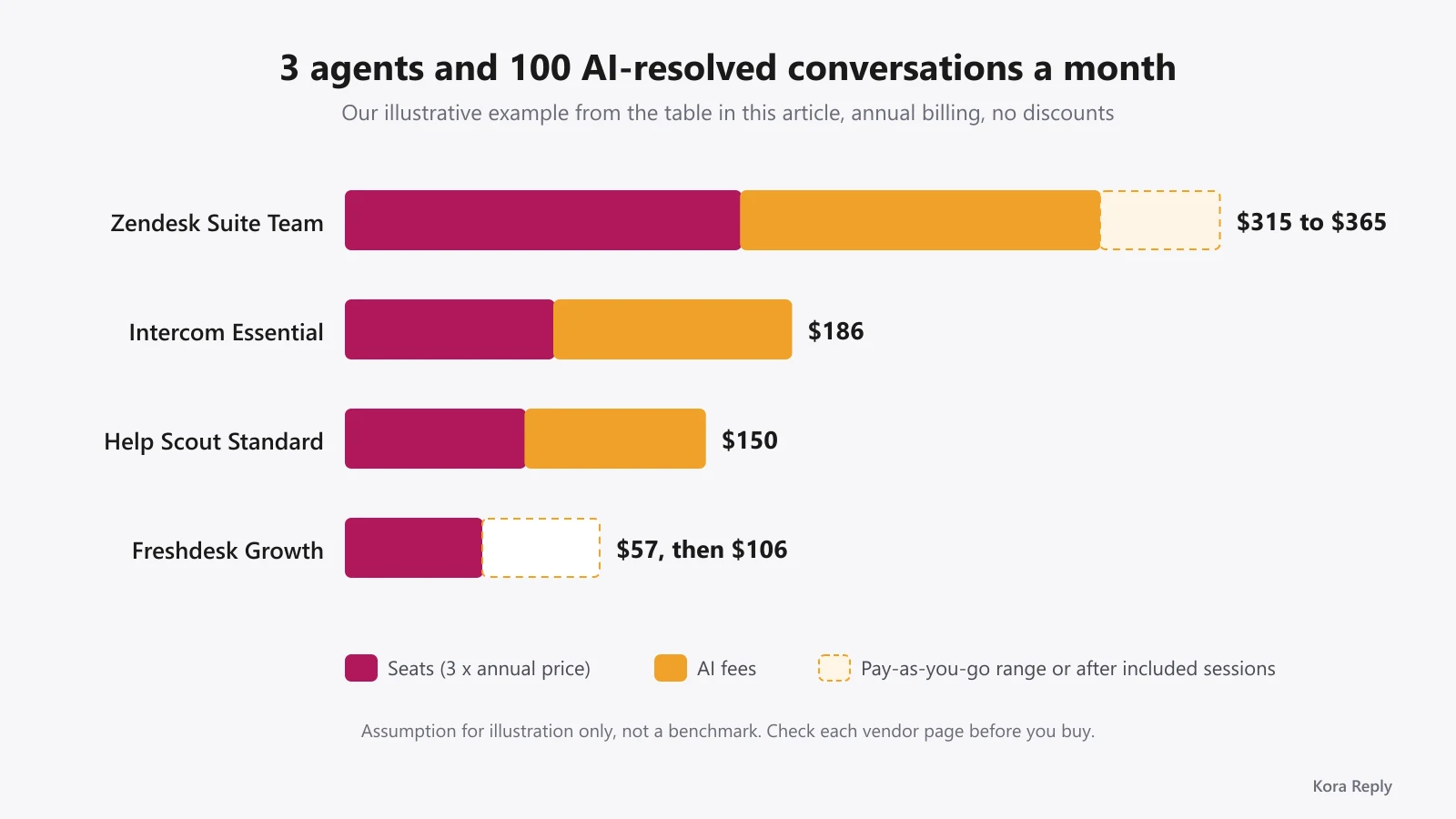
A worked example makes this concrete. Assume a 3-person team on annual billing with 100 AI-resolved conversations a month. This is our illustrative assumption, not a benchmark, and it ignores any included allowance or discount a vendor may offer.
| Plan | Seats (3 x annual price) | AI (100 outcomes) | Approx. monthly total |
|---|---|---|---|
| Zendesk Suite Team | $165 | $150 to $200 | $315 to $365 |
| Intercom Essential (list) | $87 | $99 | $186 |
| Help Scout Standard | $75 | $75 | $150 |
| Freshdesk Growth | $57 | $0 while the first 500 included sessions last, then $49 | $57, then $106 |
Key takeaway: per-outcome AI is fair when AI resolves a lot, because you only pay for success. It becomes painful when volume grows faster than headcount. Model your bill at 2x and 5x today's ticket volume before you sign an annual contract.
Our contrarian view: the cheapest seat price is rarely the cheapest help desk. A $19 seat with email only can cost more than a $29 seat once you add the chat and help center add-ons you will need within a year. Price the plan you will be on in 12 months, not the one on the banner. Our guide to customer service automation shows where AI actually saves time and where it just moves work around.
Best help desk software for small business: a 5-minute decision guide
If you want the best help desk software for small business use and do not have a week for demos, answer these four questions in order.
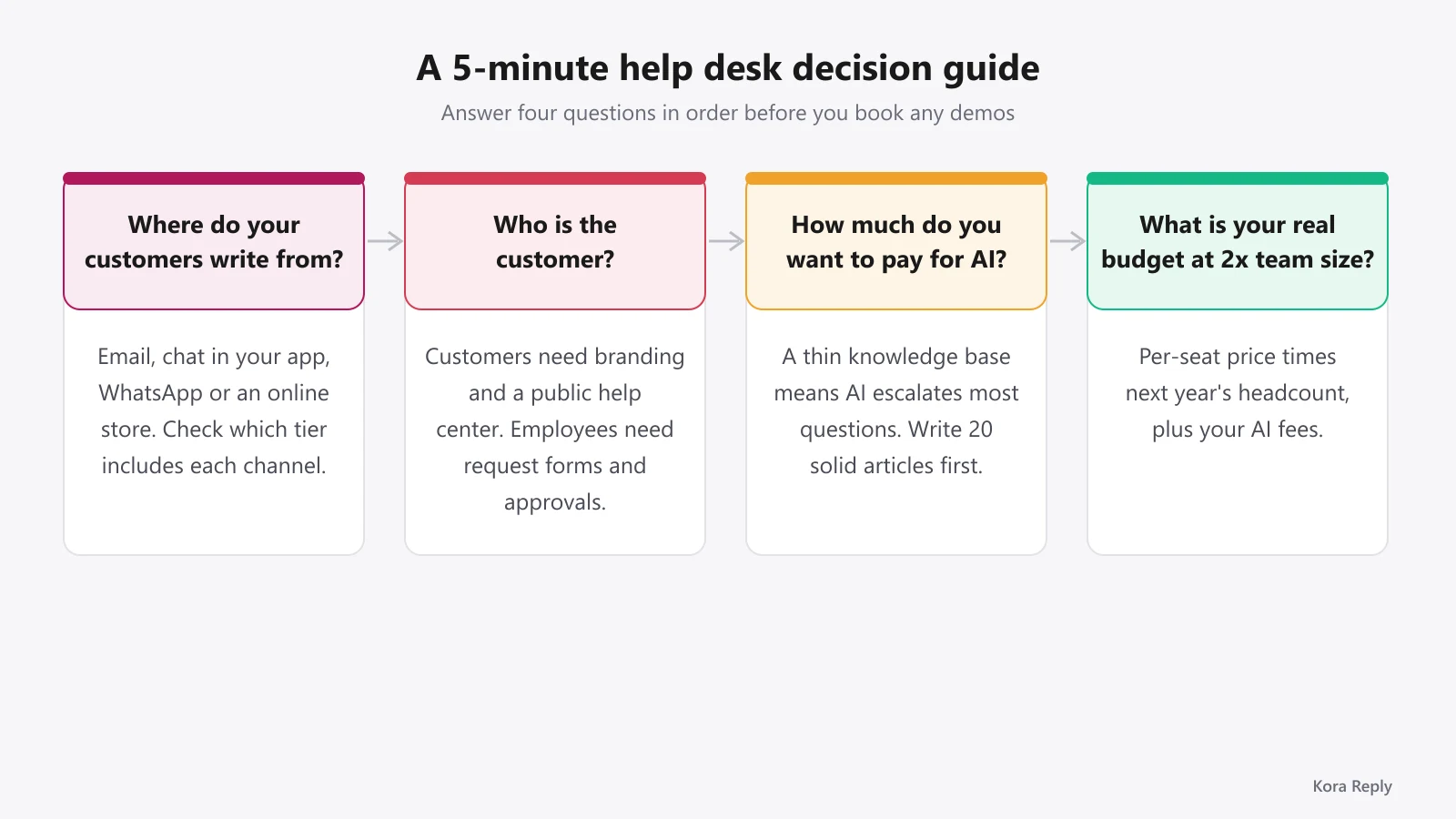
Where do your customers write from?
- Mostly email: Help Scout, Freshdesk Growth or a shared-inbox tool like Helpwise.
- Chat inside your app or site: Intercom, or any tool with solid live chat.
- WhatsApp and social: check which tier includes it. At Front it is Professional; at Help Scout it is Standard.
- Online store: Gorgias, or a general help desk with order context.
Who is the customer?
External customers need branding, a public help center and friendly AI. Employees need request forms, asset links and approvals. If it is employees, start with Jira Service Management, ManageEngine or Spiceworks, and see our IT help desk notes.
How much do you want to pay for AI?
If your knowledge base is thin, AI will escalate most questions, so per-outcome pricing stays low but so does the value. Write 20 solid help articles first. Our knowledge base software page explains why answer quality depends on article quality.
What is your real budget at 2x team size?
Multiply the per-seat price by your headcount in a year, then add AI. A flat-price or ticket-based plan (Gorgias, or flat team plans from smaller vendors) can win once you pass 6 to 8 agents. Free plans also help here; our list of the best free ticketing system options covers what each free tier really allows.
Mistakes we see teams make when they switch
These come from reading pricing pages and setup docs closely while building our own product.
Buying for the demo, not the queue. Demos show AI answering a perfect question. Your queue has refund disputes and angry follow-ups. Test with your own last month of tickets.
Ignoring response targets. Without SLA management (rules that flag a ticket before it misses your promised first-response time), small teams quietly let tickets age. Make sure even your entry plan supports at least one response target.
Skipping canned replies. In our view, 20 well-written saved replies are the fastest win on day one, because most small queues repeat the same handful of questions. Our saved replies page covers how to organize them, and our free canned response generator helps you draft them.
Treating migration as an afternoon. Moving tickets, macros and help articles takes planning. Export history first, and keep the old tool read-only for a month.
If you are still weighing the basics, our help desk guide and ticketing system guide explain the core concepts, and the help desk for small business page shows what a small team needs on day one. Want to compare more options side by side? Browse all help desk alternatives.
Frequently asked questions
There is no single winner. Teams that mostly answer email do well with Help Scout or Freshdesk Growth, ecommerce brands often look at Gorgias, chat-first SaaS teams look at Intercom, and internal IT teams look at Jira Service Management or ManageEngine ServiceDesk Plus. Shortlist by the channels you need on day one and by how the vendor charges for AI.
Yes, with limits. As of October 2026, Help Scout Free covers 5 users, 1 inbox, 1 Docs site and 100 contacts a month, Jira Service Management is free for 3 agents, ManageEngine ServiceDesk Plus Cloud Standard is free for up to 5 technicians, Chatwoot Hacker is free for 2 agents and 500 conversations a month, and Spiceworks offers a free core plan. Kora Reply also has a Free plan for 2 users.
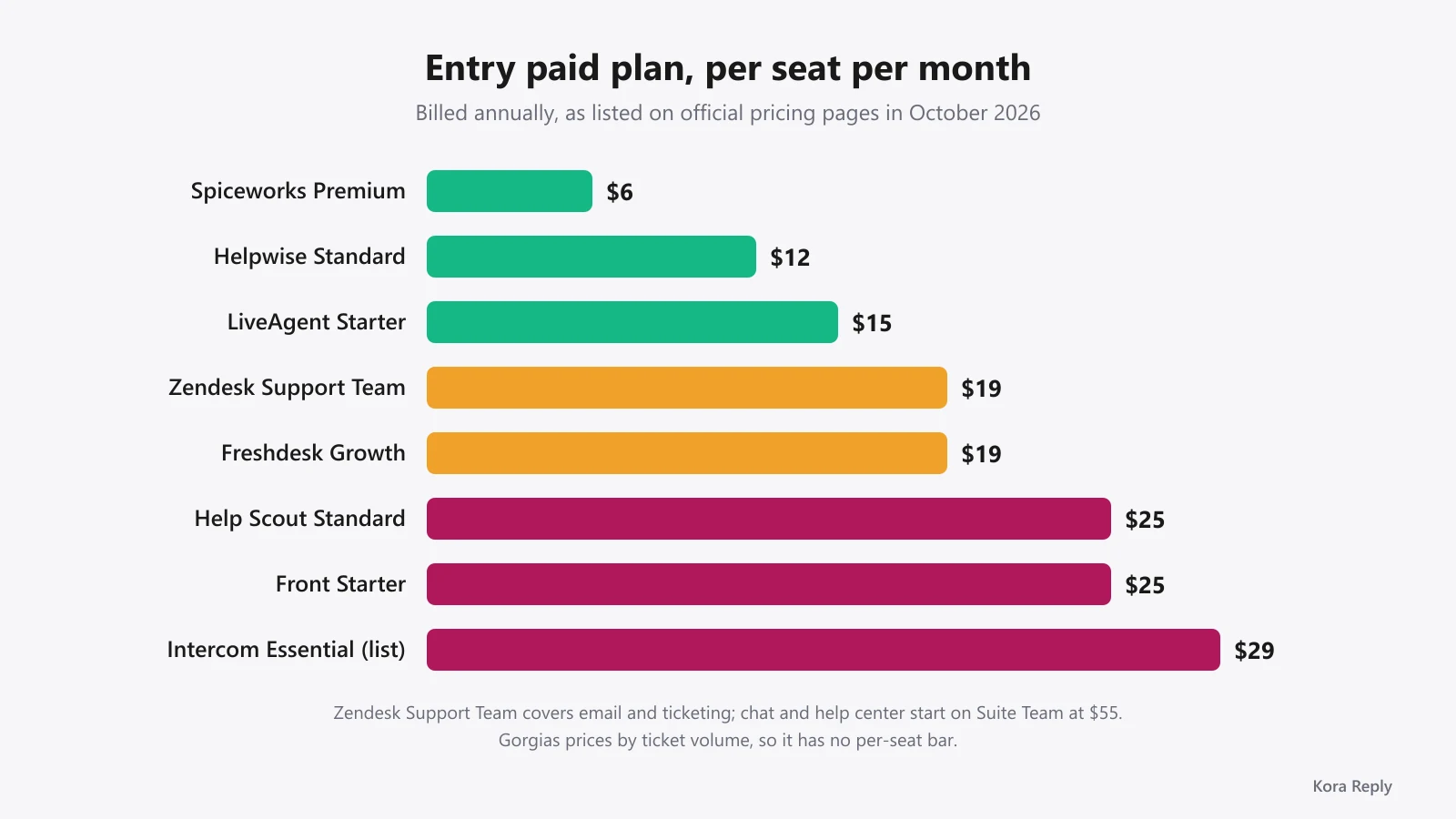
Entry plans on official pricing pages in October 2026 ranged from $6 per seat (Spiceworks Premium, billed annually) and $12 per user (Helpwise Standard, annual) to $19 per agent for Zendesk Support Team and Freshdesk Growth, $25 per user for Help Scout Standard and Front Starter, and $29 per seat list price for Intercom Essential (annual).
Most large vendors charge per AI outcome on top of seats: Zendesk $1.50 committed or $2.00 pay-as-you-go per automated resolution, Intercom $0.99 per Fin outcome, Help Scout $0.75 per resolution, and Freshdesk $49 per 100 sessions after the first 500. At a few hundred AI answers a month, that line can match or exceed your seat bill.
A help desk focuses on answering questions and fixing issues, usually for customers. A service desk is a broader IT service management function that also handles service requests, changes and assets for employees. Many small teams only need a help desk.
Open source tools such as Chatwoot can be self-hosted, which gives you full control of data and no per-seat license on the community edition. The trade-off is that someone on your team owns hosting, upgrades, backups and security. If nobody wants that job, a hosted plan is usually cheaper in practice.
Kora Reply is a new help desk built for small teams: shared inbox, tickets, quick replies, a public knowledge base and an AI agent that answers from that knowledge base and hands off to a human with a summary. It does not yet offer voice, SSO or advanced routing, so larger or regulated teams should look at the established vendors first.
Final thoughts
The best help desk software is a fit question, not a leaderboard. Start from your channels, price the plan you will need in a year, and model AI fees at higher volume before you commit. If you are a small team that wants email, chat, a help center and AI in one place without per-resolution fees, you can start a free Kora Reply workspace and test it with your real tickets. If another tool on this list fits better, pick that one.
Sources
All pages fetched on October 25, 2026. Prices change often; check the vendor page before buying.
- Zendesk pricing
- Zendesk Help: About automated resolutions for AI agents
- Freshdesk pricing (Freshworks)
- Help Scout pricing
- Intercom pricing
- Front pricing
- Gorgias pricing
- Jira Service Management pricing (Atlassian)
- ManageEngine ServiceDesk Plus pricing
- Spiceworks free cloud help desk software
- Chatwoot pricing
- Chatwoot on GitHub
- Helpwise pricing
- LiveAgent pricing
Related articles
 Help desk software
Help Desk vs Service Desk: Key Differences and Which You Need
Help desk vs service desk explained: definitions from ITIL, a side-by-side table, where desktop support fits, and how to pick the right one for your team.Read article Ticketing