AI customer service: a practical guide for small support teams
AI customer service works best when it answers the questions you already have good answers for, and hands everything else to a person with a clear summary. This guide covers the realistic uses of AI in customer service, the risks, the pricing models and a rollout plan for a small team.
On this page
AI answers, then a clean handoff
The Kora Reply AI agent answers from your help center articles and, when a person is needed, hands over with a summary of what the customer needs and what it tried.
See the AI agent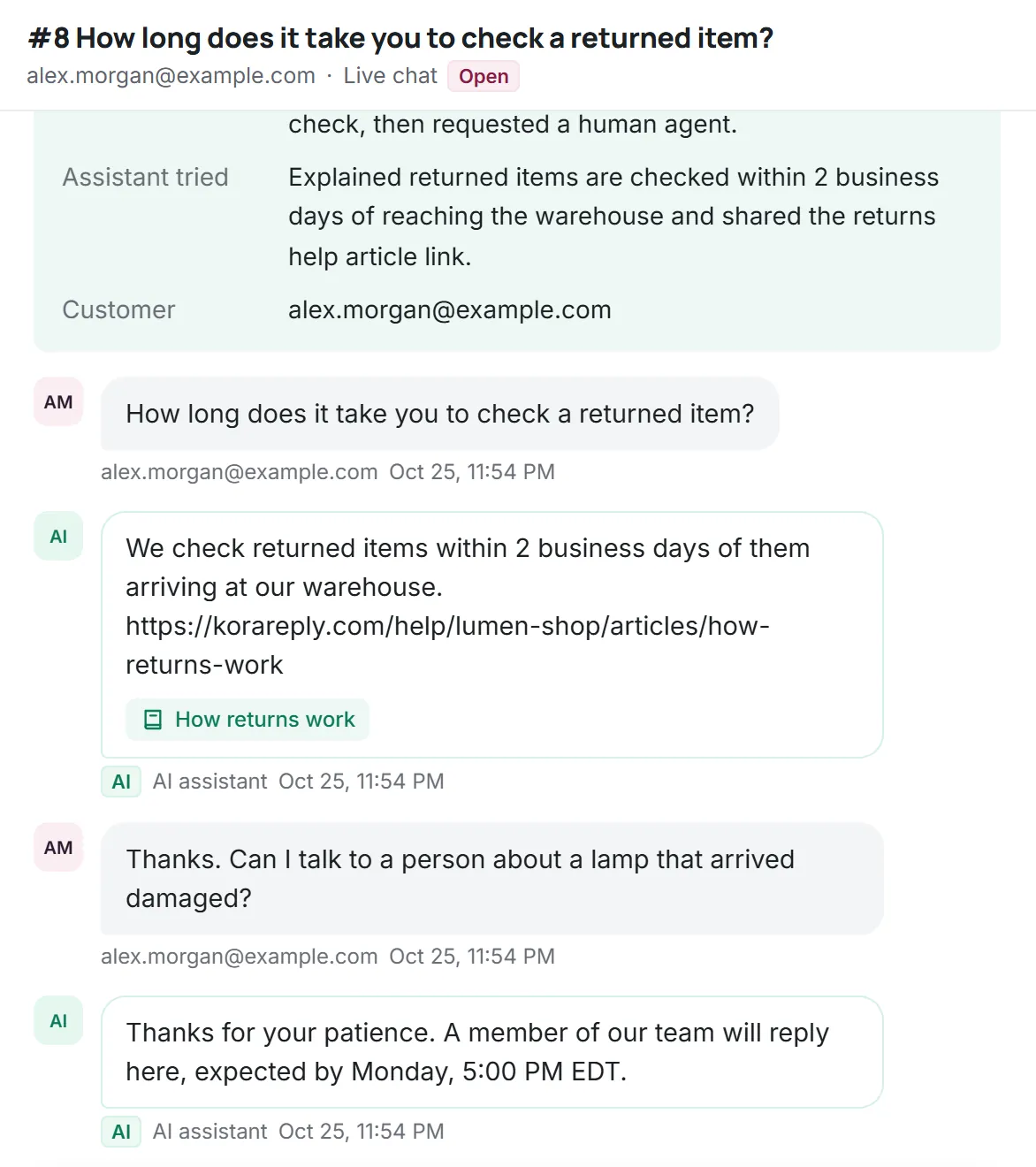
Most of what customers ask a small business is not new. Where is my order, how do I reset my password, do you ship to my country, can I change my plan. A well-informed person answers these in a minute; the problem is that a small team answers them dozens of times a week while harder questions wait. That is the gap AI can close, provided it is set up to know its limits.
What AI customer service means today
"AI customer service" covers several different jobs, and it helps to separate them, because each has a different risk level:
- An AI agent that answers customers directly, in chat, email or messaging, using your help content. Highest value, highest risk.
- Drafting help for people (often called a copilot): the AI suggests a reply and a person edits and sends it. Lower risk, because a human checks every answer.
- Triage: suggesting a priority, a label or the right teammate for an incoming request.
- Summaries: condensing a long thread into a few lines, for handoffs and for anyone picking up a ticket.
- Search: helping customers and agents find the right article even when they use different words.
Tools such as ChatGPT made people expect natural conversation from chatbots, and modern AI customer service software can deliver it. The difference between a helpful AI agent and an embarrassing one is rarely the model. It is what the AI is allowed to say, what it is allowed to read and when it stops.
AI in customer service: practical examples
| Task | How AI helps | Risk |
|---|---|---|
| How-to questions | Answers from a knowledge base article and links to it | Low, if the article is correct |
| Opening hours, shipping regions, plan limits | Quotes the policy page directly | Low |
| Order or account status | Needs a live lookup in your systems; without one, the AI should hand off | Medium |
| Refunds, cancellations, billing disputes | Collects details, then hands off to a person | High: money and policy exceptions |
| Complaints and upset customers | Acknowledges and hands off quickly with a summary | High: tone matters more than speed |
| Long threads for a teammate | Summarises what was asked and what was tried | Low |
When AI should hand off to a person
An AI agent that never hands off is a wall. A good one treats handoff as a normal outcome, not a failure. Clear triggers:
- The customer asks for a person, in any wording.
- The answer is not in your knowledge base, or the best match is weak.
- The topic involves money, legal matters, safety or account security.
- The customer is frustrated, or the same question has been asked twice.
- The AI usage budget for the month is used up.
The quality of the handoff matters as much as the timing. The person who takes over should see a short summary: what the customer wants, what the AI already said, and what is still open. Without it, the customer has to explain everything again, which undoes the time the AI saved.
Answer only from your own content
Large language models can write fluent, confident text about almost anything, including things that are not true for your business. The standard defence is grounding: the AI first retrieves the relevant passages from your own knowledge base, then answers only from those passages and cites them. If nothing relevant is found, it says so and hands off.
Grounding moves the work to where it belongs: your articles. If an article is outdated, the AI will repeat the outdated policy. That is why the best preparation for AI customer service is a short audit of your top articles, and why we recommend writing the knowledge base before switching the AI on.
Writing articles an AI can use well
Articles written for people usually work for AI too, but a few habits make a noticeable difference to answer quality:
- One topic per article. When an article covers returns, exchanges and gift cards at once, the AI is more likely to mix up the rules. Split it.
- State conditions explicitly. "Returns are accepted within 30 days of delivery for unused items" is easier to apply correctly than a paragraph of examples.
- Write the exceptions down. If sale items cannot be returned, say so in the article; the AI cannot know what is only in your head.
- Use the words customers use. Retrieval works by matching the question to your text, so include common phrasings in titles and first sentences.
- Remove outdated content. An unpublished draft or an old policy left online can be retrieved and quoted. Retire what no longer applies.
The knowledge base guide covers structure, categories and maintenance in more depth.
Risks and how to contain them
- Wrong answers. Contained by grounding, a relevance threshold and a rule that the AI never promises refunds, discounts or dates.
- Prompt injection. Customers (or text inside a pasted email) may try to instruct the AI to ignore its rules. Treat customer text as data, never as instructions.
- Privacy. Avoid sending more personal data to the model than the answer needs, and remove things like card numbers before processing.
- Runaway cost. Per-conversation limits and a monthly budget stop a loop or a spike from turning into a large bill.
- Tone. Review a sample of AI conversations every week, the same way you would coach a new teammate.
Telling customers they are talking to AI
Being upfront that a reply comes from AI is good practice, and in the European Union it is becoming law. Article 50 of the EU AI Act requires providers to design AI systems that interact directly with people so that those people are informed they are interacting with an AI system, unless that is obvious from the context; the article's obligations come into force on 2 August 2026 (EU AI Act, Article 50, checked Oct 2026). This is a summary, not legal advice: check what applies to your business. Whatever the legal position, a visible label and an easy way to reach a person reduce frustration.
How AI customer service is priced
Pricing is where AI tools differ most, and it is worth modelling before you switch anything on. The most common model charges for each conversation the AI resolves, on top of seat prices. Some examples from official pricing pages:
- Intercom Fin AI Agent: $0.99 per outcome (intercom.com/pricing, checked Oct 2026).
- Zendesk AI agents: billed per automated resolution, with 5 included per agent per month on Suite Team and extra resolutions at $1.50 committed or $2.00 pay as you go (zendesk.com/pricing, checked Oct 2026).
- Help Scout AI Answers: $0.75 per resolution with an optional monthly spending cap (helpscout.com/pricing, checked Oct 2026).
Per-resolution pricing means you pay more as the AI gets better. A quota model, where a monthly allowance is included in the plan, makes costs predictable but means unused allowance is simply not used. Neither is wrong; what matters is that you can estimate a normal month. Kora Reply uses a quota: every plan includes a pooled number of AI conversations a month, with extra packs if you need them (see pricing).
A safe rollout plan for AI customer service
- List your top questions. Look at the last month of tickets and group them. The top ten usually cover a large share of volume.
- Write or fix the articles. One clear article per question, with the policy stated plainly.
- Start on one channel. Live chat on your website is a good first channel because the conversation is short and visible.
- Hand off generously at first. Keep the relevance threshold strict and the handoff triggers broad. You can loosen them later.
- Review every AI conversation for the first two weeks. Fix articles where the AI was unsure; add articles for questions it could not answer.
- Expand gradually. Add email, then messaging, once the AI's answers on chat are consistently right.
For the wider picture of automating routine work (auto-replies, routing and saved replies as well as AI), see our article on customer service automation.
Measuring AI customer service
- AI-resolved share: conversations closed without a person, and whether customers came back about the same issue.
- Handoff rate and reasons: which topics the AI hands off most. Each one is a candidate for a new article.
- Satisfaction for AI and human conversations separately, using the same CSAT question.
- Wrong-answer reports: every one should lead to an article fix within a day.
- Cost per month against the estimate you made before launch.
How Kora Reply's AI agent works
The Kora Reply AI agent follows the approach in this guide. It answers only from articles published in your knowledge base and cites them. When it cannot find a good answer, when the customer asks for a person or when the topic is sensitive, it hands the conversation to your team with a short summary. Every plan, including Free, includes a monthly AI quota; when the quota runs out, new conversations go straight to people and nothing is billed automatically. The AI never replaces your team. It clears the repeated questions so your people have time for the ones that need them.
Frequently asked questions
Not for a small business that cares about its customers. AI handles repeated questions well when it answers from your own articles, but refunds, complaints and anything new still need people. The best setups hand off to a person with a summary.
It is as accurate as the content it reads and the rules around it. Grounding answers in your knowledge base, citing sources and handing off when no good match exists keep wrong answers rare.
In the EU, Article 50 of the AI Act requires that people are informed when they interact with an AI system unless it is obvious, with obligations in force from 2 August 2026. Elsewhere it is still good practice. Check what applies to your business.
Models differ. Many vendors charge per AI resolution on top of seats, for example $0.99 per outcome at Intercom (checked Oct 2026). Others, including Kora Reply, include a monthly AI quota in the plan.
Start with your ten most common questions: make sure each has a clear article, switch the AI on for website chat only, hand off generously and review every AI conversation for the first two weeks.
Run your support desk from one calm inbox
Kora Reply gives a small team a shared inbox, tickets with response targets, a public knowledge base and an AI agent that hands off with a summary. The Free plan needs no card.