What is a help desk? A practical guide for small teams
A help desk is the place where every customer question lands, gets an owner and is tracked until it is answered. This guide explains how a help desk works, what it should include and how a small team can choose one without overpaying.
On this page
A help desk in one shared queue
Kora Reply puts email, live chat and WhatsApp in one inbox with views for All, Mine, Unassigned and Overdue, so every request has an owner.
See the shared inbox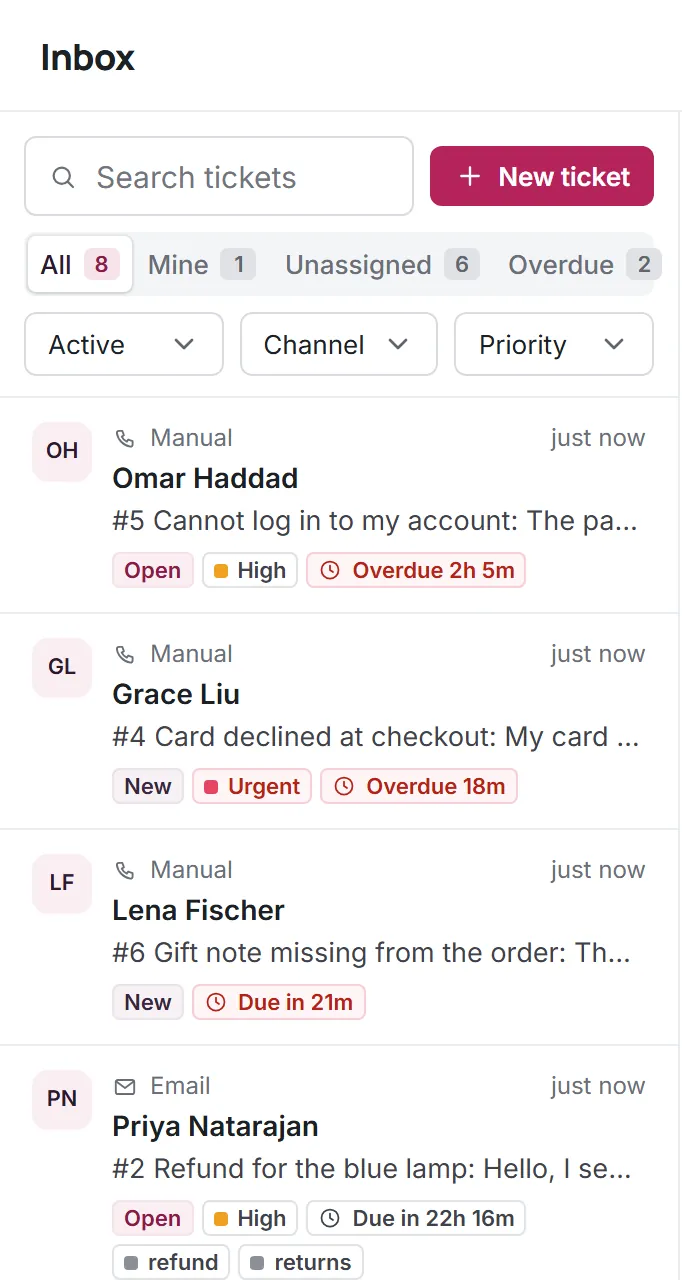
Most teams do not decide to buy a help desk. They notice the symptoms first: a customer writes twice because nobody answered, two people reply to the same email with different answers, or a refund request sits in someone's personal inbox while they are on holiday. A help desk exists to remove those failures. It gives every request a record, a status and a person responsible for it.
Help desk definition and meaning
In plain terms, a help desk is a system (and the small team around it) that receives questions and problems, keeps each one as a trackable item and makes sure each gets a reply. The item is usually called a ticket or a conversation. When people search for the help desk meaning, they are often asking about one of two things: the support function itself ("contact the help desk") or the software that runs it. This guide covers both, because the software only works when the habits around it are clear.
What is help desk software, then? It is the tool that collects requests from your channels (email, live chat on your website, WhatsApp and so on), turns them into tickets and gives the team shared views: what is new, what is mine, what is waiting on the customer and what is late. Good help desk software also stores the full history, so whoever picks up a ticket can see what was already said.
How a help desk works, step by step
Every help desk, whether it serves customers or employees, follows the same basic loop. Knowing the loop makes it much easier to judge any tool, because each feature either supports a step or it does not.
- Capture. A request arrives by email, chat or messaging and is stored as a ticket with the customer's details and the original message.
- Triage. Someone (or a rule) sets the priority, adds labels and decides who owns it. Unassigned tickets stay visible in a shared queue so nothing waits unseen.
- Respond. The owner replies from the help desk, not from a personal mailbox, so the answer is part of the record. Colleagues can add internal notes that the customer never sees.
- Wait or escalate. If the team needs information from the customer, the ticket moves to pending. If it needs a specialist, it is reassigned with context instead of forwarded.
- Resolve. When the customer has what they need, the ticket is resolved. If they write back, it reopens with the history attached.
- Learn. Repeated questions become knowledge base articles and saved replies, so the next customer gets a faster, more consistent answer, and fewer questions arrive at all.
Response targets sit across the whole loop. A target such as "first reply within four business hours for normal priority" turns a vague promise into something the team can see and keep. You can read how this works in practice on our SLA targets page and in the ticketing system guide.
Help desk, shared inbox or service desk?
These terms overlap, and vendors use them loosely. A practical way to separate them:
| Type | Best for | Typically includes |
|---|---|---|
| Shared inbox | A few people answering one email address together | Shared email view, assignment, internal comments |
| Help desk | Customer support across several channels | Tickets with status and priority, response targets, saved replies, knowledge base, reporting |
| Service desk | IT teams running formal service management | Incidents, requests, changes, assets and approval workflows |
A shared inbox is often the first step, and many small teams outgrow it when they need priorities and targets. The full comparison of help desk and service desk, including where ITIL processes come in, is in our article on help desk vs service desk. If your team is still on Outlook, the guide to adding a shared inbox to Outlook shows how far that approach goes.
Help desk features that matter (and ones that can wait)
Feature lists in this category are long. For a team of two to twelve people, these are the ones that change daily work:
- A shared inbox across channels. Email, live chat and WhatsApp in one queue, so nobody has to check three apps.
- Tickets with status, priority and an owner. The minimum structure that makes "who is handling this?" answerable at a glance.
- Internal notes and mentions. Discussion stays attached to the ticket instead of drifting into chat apps.
- Response targets. Due times per priority, calculated on your business hours, with a clear overdue view.
- Saved replies. Reusable answers for the questions you get every week, with the customer's name filled in.
- A public knowledge base. Customers find answers themselves, and the articles double as training material for new teammates.
- An AI agent that knows when to stop. Useful for repeated questions, as long as it answers only from your own articles and hands off to a person with a summary.
Features that can usually wait for a small team: complex routing rules, telephony, workforce scheduling and custom report builders. They are valuable in large operations, but they add setup work and cost before you have the volume to need them.
Internal help desk software
Not every help desk faces customers. An internal help desk handles requests from colleagues: laptop problems, access requests, payroll questions. The loop is identical, the audience is different. Internal help desk software benefits from the same features (tickets, owners, targets, a knowledge base) and often adds a self-service portal where employees can look up answers before raising a request. If your main use is IT support, the IT help desk page explains how Kora Reply handles internal requests, and the self-service portal guide covers the portal side.
Benefits of help desk software for a small team
The advantages of help desk software are less about scale and more about reliability. For a small team they show up quickly:
- No lost requests. Every message becomes a ticket, so "I thought you replied" stops happening.
- Clear ownership. Each ticket has one owner, and the unassigned queue is visible to everyone.
- Consistent answers. Saved replies and knowledge base articles mean customers hear the same policy from every teammate.
- Holiday cover. Because history lives in the help desk, a colleague can pick up any ticket without asking for forwarded emails.
- Fewer repeated questions. Each answered question can become an article, which lets customers help themselves next time.
- Honest numbers. Even simple counts (tickets per week, how many went overdue) tell you whether you need another person or a better article.
In-house team or outsourced help desk services?
Some businesses hand support to an outside provider. Outsourced help desk services can make sense for round-the-clock coverage, for overflow during a seasonal peak, or for first-line IT support that does not need product knowledge. The trade-off is context: an external agent rarely knows your product, your customers or your policies as well as your own team does. A common middle path is to keep the help desk tool and the knowledge base in-house, and give any outside helpers access to it. That way the history, the articles and the response targets stay yours, whoever answers.
How to choose a help desk
Comparing tools by feature lists alone rarely works, because most of them tick the same boxes. These questions separate them faster:
- How is it priced? Per agent, per ticket or flat. Per-agent pricing is the most common. Some vendors use other models: Gorgias, for example, prices by ticket volume and says it is "never priced per agent" (gorgias.com/pricing, checked Oct 2026).
- Which channels are on the plan you can afford? Entry plans sometimes cover email only. Zendesk's Support Team plan, for instance, is email and ticketing without live chat or a help center; those start on Suite Team (zendesk.com/pricing, checked Oct 2026).
- How is AI charged? Many vendors bill per AI resolution on top of seats. Work out what a normal month would cost at your volume before you switch it on.
- What are the limits? Free plans are real but narrow; read the user, contact and article caps.
- Can you leave? Check that you can export tickets and articles.
A one-afternoon help desk setup plan
A help desk for a small team does not need a project plan. This order gets you live in an afternoon:
- Connect your support email address so new messages become tickets.
- Invite your teammates and decide who handles unassigned tickets each day.
- Set two or three priorities with response targets that match your business hours.
- Write saved replies for your five most common questions.
- Publish the same five answers as knowledge base articles.
- Add the live chat widget to your site, and connect WhatsApp if your customers use it.
- Turn on the AI agent last, once the articles exist, so it has something reliable to answer from.
In Kora Reply, each of these steps is available on the Free plan except WhatsApp, which is on the paid plans and currently in beta. You can create a workspace and follow the list as you go.
Help desk mistakes to avoid
- Too many statuses. New, open, pending, resolved and closed cover almost every case. Extra statuses mostly create confusion about which one to pick.
- Assigning everything to one person. It feels efficient until that person is ill. Keep a shared unassigned queue and a simple rule for who checks it.
- Targets nobody can meet. A one-hour target that is missed every day trains the team to ignore targets. Start realistic and tighten later.
- An AI agent without articles. An AI agent is only as good as the content it reads. Write the articles first.
- Replying from personal inboxes. Every reply sent outside the help desk is history the next person cannot see.
A help desk is a habit as much as a tool. Start with the loop above, keep the setup simple, and let your knowledge base grow from the questions customers actually ask.
Frequently asked questions
A help desk receives questions and problems from customers or employees, records each one as a ticket, gives it an owner and tracks it until it is resolved. It also keeps the full history so anyone on the team can pick up a ticket.
Customer service is the broader goal of looking after customers. Help desk support is the organised way of handling their individual requests: tickets, owners, priorities and response targets.
Once more than one person answers customers, or requests arrive on more than one channel, a help desk prevents lost messages and double replies. Many tools, including Kora Reply, have a free plan for very small teams.
Not quite. A help desk focuses on answering requests and fixing problems. A service desk is a broader IT service management function that also handles changes, assets and formal service processes.
Pricing models differ: per agent, per ticket or flat per team, often with a separate charge for AI. Compare what a normal month would cost at your own volume, including the channels you need, rather than the headline price.
Run your support desk from one calm inbox
Kora Reply gives a small team a shared inbox, tickets with response targets, a public knowledge base and an AI agent that hands off with a summary. The Free plan needs no card.