Ticketing system: how support tickets work from start to finish
A ticketing system gives every customer request a number, an owner and a status, so a team can see what is waiting and what is late. This guide walks through how support tickets move from first message to resolution, and what to look for in ticketing software.
On this page
Tickets with notes your team can see
Each conversation in Kora Reply is a ticket with a status, a priority, an owner and internal notes that never reach the customer.
See how tickets work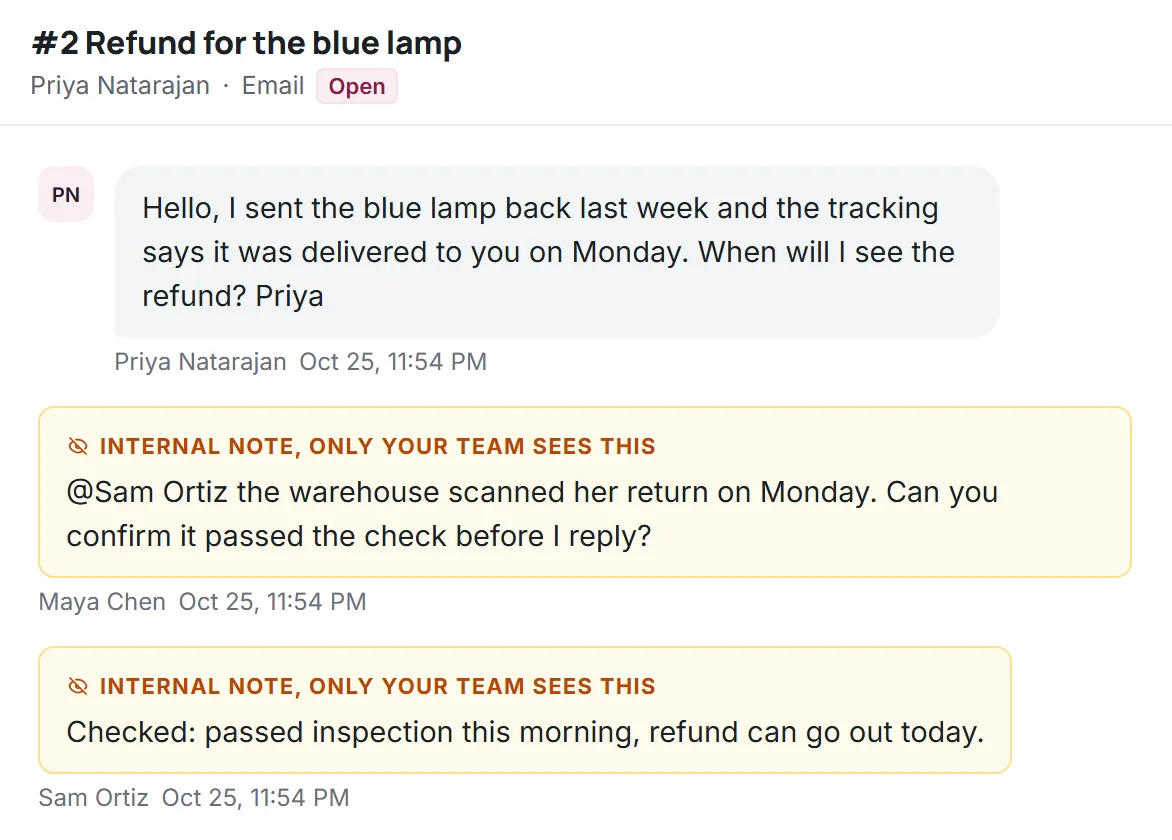
A support ticket is simply a record of one request: who asked, what they asked, what has been said since and what state it is in now. The value of a ticketing system comes from applying that record consistently. When every request is a ticket, a team can answer three questions at any moment: what is new, who is handling what, and what is about to miss its target.
What a ticketing system is
A ticketing system (also called ticketing software or a support ticket system) collects incoming requests from your channels and stores each one as a ticket. People often use help desk ticketing system and customer service ticketing system for the same thing; the difference is mostly the audience. A help desk ticketing system usually serves customers or employees asking for help, while project trackers and bug trackers use tickets for internal work. This guide is about support tickets: questions and problems from the people you serve.
Ticketing is the backbone of a help desk. The shared inbox, the knowledge base and the AI agent all sit around it, but the ticket is the unit everyone works on. Our ticket management page shows how Kora Reply implements the ideas below.
Anatomy of a support ticket
Most ticketing systems store the same core fields. Knowing them helps you judge whether a tool covers the basics before you look at anything else.
| Field | What it is for |
|---|---|
| Requester | The customer or employee who asked, with their contact details and past tickets. |
| Channel | Where the request came from: email, live chat, WhatsApp or a form. |
| Subject and messages | The original request and every reply since, in order. |
| Status | Where the ticket is in its lifecycle (new, open, pending, resolved, closed). |
| Priority | How urgent it is, which drives the response target. |
| Assignee | The one person responsible right now. |
| Labels | Free tags such as refund, bug or billing, used for filtering and reporting. |
| Internal notes | Team-only comments the requester never sees. |
| Due times | When the first reply and the resolution are due under your targets. |
| Activity log | Who changed what and when, so the history can be trusted. |
Ticket statuses and the ticket lifecycle
Statuses are where many teams overcomplicate things. Five are enough for nearly every support desk:
- New. Arrived, nobody has touched it yet.
- Open. Someone is working on it, and the next move is ours.
- Pending. We are waiting on the customer (or a third party). The target clock usually pauses here.
- Resolved. We believe the request is answered. If the customer replies, it reopens automatically.
- Closed. Final. A new message starts a new ticket that links back to this one.
The rule that matters most is that the status should always tell you whose turn it is. If a teammate needs to ask "is this one waiting on us?", the statuses are not doing their job. Kora Reply uses exactly these five, and a customer reply on a resolved ticket moves it back to open with the full history attached.
Priorities and response targets
Priority answers "how soon?". Most teams need three or four levels, for example urgent, high, normal and low. Each level gets two targets: time to first reply and time to resolution. These are often called SLA targets, from service level agreement, even when no contract is involved.
Two details make targets fair. First, they should count business hours, not clock hours. A ticket that arrives on Friday evening should not be overdue by Saturday morning if your team does not work weekends. Second, the clock should pause while a ticket is pending on the customer. Without both rules, targets punish the team for things outside its control, and people stop trusting them.
Kora Reply calculates due times on each workspace's own business hours and holidays, and shows tickets that are due soon or overdue in their own view. More on this on the SLA targets page.
How an email becomes a ticket
Email is still the most common support channel, and email ticketing has a few technical details worth understanding, because they decide whether conversations stay in one ticket or split into many.
Every email carries a unique Message-ID header, and replies carry In-Reply-To and References headers that point back to earlier messages. These fields are defined in the internet message format standard, RFC 5322. A good email ticketing system uses them to attach a customer's reply to the right ticket even when the subject line has changed, instead of relying on the subject alone.
The second detail is loops. Out-of-office replies and other automatic messages can bounce back and forth with a help desk's own auto-acknowledgements. RFC 3834 describes how automatic responses should mark themselves (with an Auto-Submitted header) and why responders should not answer messages that are already automatic. Ticketing software that respects this avoids filling your queue with robot conversations.
If email is your main channel, see email ticketing for how Kora Reply handles forwarding, threading and replies, and our article on writing customer service emails for the human side.
Assignment and collaboration
One owner per ticket is the simplest rule that works. Shared ownership sounds friendly but usually means nobody feels responsible. What helps instead:
- An unassigned view that everyone can see, plus a simple agreement about who checks it and when.
- A "mine" view so each person starts the day with their own list.
- Internal notes with mentions, so asking a colleague for help happens on the ticket, where the next person will see it.
- Conflict protection, so two people editing the same ticket at once do not silently overwrite each other.
- Saved replies for frequent answers, so speed does not cost consistency.
Ticket triage in practice
Triage is the short decision made when a ticket first arrives: how urgent is it, what is it about and who should own it. Done well, it takes under a minute per ticket and saves far more later. A simple routine for the person on triage duty:
- Scan for urgency first. Outages, payment failures, security reports and anything with a legal deadline go to the top.
- Merge duplicates. A customer who wrote by email and then by chat should end up with one ticket, not two people working in parallel.
- Label the topic. Two or three words such as refund, delivery or login are enough for filtering and later counting.
- Assign an owner, or answer immediately if the reply takes less time than assigning it would.
- Leave a note when the next step is not obvious, so the owner does not have to reconstruct the triage decision.
An AI agent can take some of this load by answering simple questions from your knowledge base before they ever reach triage, and by passing everything else on with a short summary. The AI customer service guide explains where that works well and where it does not.
Ticketing system or CRM?
People often search for a CRM ticketing system, or a CRM with a ticketing system built in. The two tools overlap but have different centres. A CRM is organised around accounts and deals: who the customer is and what they might buy. A ticketing system is organised around requests: what the customer needs right now and whether it has been handled. Sales-led businesses with long relationships sometimes prefer support inside the CRM. Most small support teams are better served by a dedicated ticketing system that shows the customer's past tickets next to each request, and an export or integration if sales needs the data.
Cloud based ticketing system or self-hosted?
A cloud based ticketing system (sometimes called an online ticketing system) runs on the vendor's servers: you sign up and start. Self-hosted tools, often open source, run on your own servers: you control the data and the code, and you also own updates, backups, email deliverability and security. For a small team without someone who enjoys running servers, cloud is usually the safer choice. If you are weighing it up, our articles on open source ticketing systems and the best ticketing tools compare both routes.
Ticketing metrics worth tracking
You do not need a dashboard full of charts. Five numbers tell a small team almost everything:
- New tickets per week, to see whether volume is growing faster than the team.
- Time to first reply, measured in business hours against your target.
- Time to resolution, the same way.
- Overdue tickets, the count that most directly predicts unhappy customers.
- Customer satisfaction after resolution, usually as a CSAT score. The CSAT guide explains how to collect it, and the CSAT calculator works it out from your survey answers.
Choosing ticketing software: a short checklist
- Are the five statuses, priorities, owners and internal notes all on the plan you would actually buy?
- Do response targets use your business hours and pause while pending?
- Does email threading survive changed subject lines and ignore automatic replies?
- Which channels come with the plan: email only, or also live chat and WhatsApp?
- How is AI priced, and what happens when an AI quota or budget runs out?
- Can you export your tickets if you leave?
Free options exist and can be a good start; see our roundup of free ticketing systems. When you are ready to compare named products, the alternatives hub lists prices and limits from each vendor's official page. And if you want to try the workflow described here, Kora Reply's Free plan includes tickets, response targets and saved replies: create a workspace.
Frequently asked questions
A ticketing system records every customer or employee request as a ticket with an owner, a status and a priority, so the team can see what is waiting, who is handling it and what is about to miss its response target.
They are often the same thing. Some tools call each customer thread a conversation and treat ticket fields such as status, priority and assignee as properties of it.
Five cover almost every support desk: new, open, pending, resolved and closed. The status should always tell you whose turn it is.
Yes, many ticketing systems bring email, live chat and messaging channels into one queue. Check which channels are included on the plan you would buy, because some vendors put them on higher tiers.
For very small teams, often yes. Read the limits on users, conversations and articles, and check whether you can export your data later.
Run your support desk from one calm inbox
Kora Reply gives a small team a shared inbox, tickets with response targets, a public knowledge base and an AI agent that hands off with a summary. The Free plan needs no card.