CSAT explained: the customer satisfaction score and how to improve it
CSAT, short for customer satisfaction score, tells you how many customers left a conversation satisfied. This guide covers what CSAT means, how to calculate it, which survey questions to ask and what actually moves the number.
On this page
What drives satisfaction today
Built-in CSAT surveys are on the roadmap. Today Kora Reply gives you first reply targets per priority and business hours, so fast answers stop depending on memory.
See response targets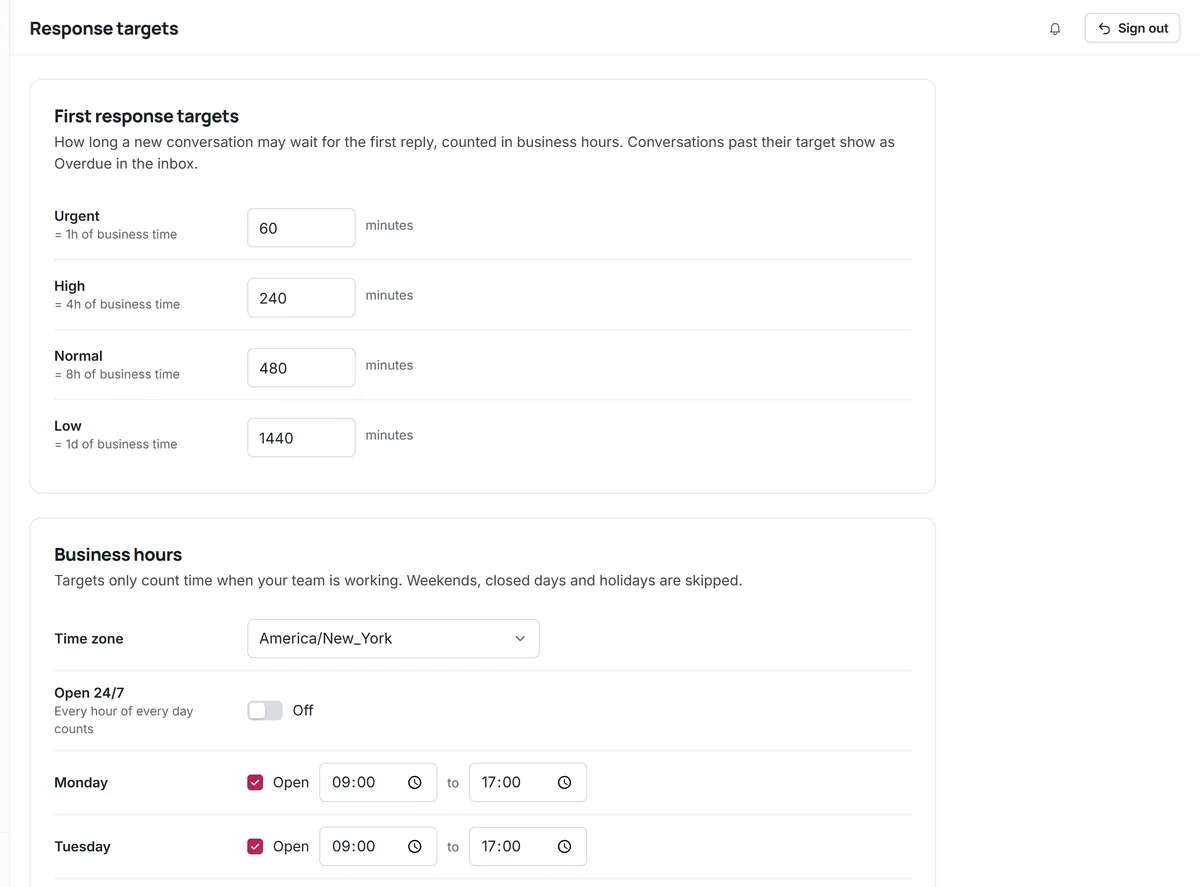
Customer satisfaction sounds hard to measure, but the most common metric for it is deliberately simple. You ask one question right after an interaction, count how many people chose the top answers and turn that into a percentage. That simplicity is why CSAT is so widely used in support teams, and also why it is easy to misread. The sections below explain both the method and the traps.
CSAT meaning: what the score stands for
CSAT stands for customer satisfaction, and the CSAT score is the percentage of survey respondents who say they were satisfied with a specific interaction, such as a resolved ticket or a chat. It is a transactional metric: it describes how a customer felt about one experience, not about your company in general. That is what makes it useful for support teams, because each score can be traced back to a conversation, a channel and the people who handled it.
In practice, a CSAT survey is usually one question ("How satisfied were you with the help you received?") with a short rating scale, plus an optional comment box. The comment is often more valuable than the number.
How to calculate a CSAT score
The most common formula counts only the positive answers:
Example: you receive 80 responses in a month. 52 people chose 5 and 12 chose 4, so 64 responses are satisfied. Your CSAT is 64 / 80 x 100 = 80%.
Some teams report the average rating instead (for example 4.2 out of 5). Both are valid, but they are not interchangeable, so always state which one you use and keep it consistent over time. Our free CSAT calculator works out the percentage from your counts and shows the steps.
CSAT, NPS and CES: which metric for what
Three survey metrics come up again and again in customer service. They answer different questions:
| Metric | Typical question | Best for |
|---|---|---|
| CSAT | How satisfied were you with this interaction? | Judging individual conversations, channels and processes |
| NPS | How likely are you to recommend us to a friend or colleague? (0 to 10) | Overall loyalty to the company, tracked over months |
| CES | How easy was it to get your issue resolved? | Finding friction in a process, such as returns or sign-up |
Net Promoter Score is the percentage of promoters (those who answer 9 or 10) minus the percentage of detractors (0 to 6), as defined by its creators at Bain & Company's Net Promoter System. Because it asks about the relationship rather than one ticket, NPS moves slowly and is better as a company-level signal. You can work it out with our NPS calculator and read about wording in NPS survey questions. For a support team's weekly work, CSAT is usually the more actionable of the two.
CSAT survey questions and examples
The best CSAT survey questions are short, specific to the interaction and easy to answer on a phone. A few sample CSAT questions that work well:
- "How satisfied were you with the help you received today?" (1 to 5, very dissatisfied to very satisfied)
- "Did we solve your problem?" (yes / partly / no), followed by the satisfaction question
- "How would you rate your conversation with Sam?" (when you want feedback on an individual)
- "Anything we could have done better?" (optional free text)
Keep the scale the same everywhere, label both ends in words, and avoid leading wording such as "How great was your experience?". If you want a longer questionnaire for occasional research, our article on customer satisfaction survey questions has more examples grouped by goal.
When and how to send a CSAT survey
- Right after resolution. Memory fades quickly; a survey sent days later measures something else.
- One survey per ticket. Asking after every message annoys customers and inflates your response count with repeats.
- In the same channel. A rating link at the end of the email thread, or a quick prompt at the end of a chat, gets more answers than a separate campaign.
- One click to answer. Let the rating itself submit the response, then offer the comment box as an optional second step.
- Skip the obvious exclusions. Spam, duplicates and internal test tickets should not receive surveys.
A ready-to-use CSAT survey
If you are starting from nothing, this short CSAT survey sample covers what most small teams need. Send it once, right after a ticket is resolved:
- Rating (required): "How satisfied are you with the help you received?" 1 Very dissatisfied, 2 Dissatisfied, 3 Neutral, 4 Satisfied, 5 Very satisfied.
- Resolution (optional): "Was your issue resolved?" Yes / Partly / No.
- Comment (optional): "What is one thing we could have done better?"
Store each answer with the ticket it belongs to, the channel, the topic label and whether a person or the AI agent resolved it. Those four fields are what turn a single CSAT score into something you can act on. Keep the wording identical for at least a few months, because changing a question resets your baseline.
What is a good CSAT score?
There is no universal good CSAT score. Published averages vary by industry, by scale and by how the survey is sent, and a figure measured one way cannot be compared with one measured another way. A 5-point scale counting 4 and 5 as satisfied will produce different numbers from a thumbs up/down survey, even for the same customers.
The useful comparison is with yourself: your CSAT this month versus last month, by channel, by topic and by priority. A drop from your own baseline is a real signal. A difference from someone else's published average usually is not.
Reading your CSAT results
A single percentage hides most of the story. Four habits make CSAT data more honest:
- Watch the response rate. If only a small share of customers answer, the score mostly reflects people with strong feelings. Report the number of responses next to the score.
- Segment it. Break CSAT down by channel, label (refund, bug, how-to) and whether the AI agent or a person resolved the ticket. Problems usually cluster.
- Read the comments. A low rating with "the product is too expensive" is a pricing signal, not a support failure. Tag comments so the right team sees them.
- Look at the tickets behind low scores. Was the first reply late? Did the customer have to repeat themselves? Was the answer correct but the policy unpopular?
How to improve CSAT
Improving CSAT is rarely about the survey. It is about the experience the survey measures. The changes that tend to move it:
- Reply faster, especially the first reply. Set realistic response targets by priority and watch the overdue list daily.
- Never make customers repeat themselves. Keep the full history in one shared inbox, and when the AI agent hands off, pass a summary so the person picking it up starts informed.
- Resolve on the first reply when you can. Saved replies and a good knowledge base give every teammate the complete answer, not a partial one.
- Set expectations honestly. If a refund takes five working days, say so in the first reply. Surprises hurt satisfaction more than slow but predictable processes.
- Close the loop on feedback. When a comment leads to a fix, tell the customer. It turns a low score into a reason to trust you.
- Write in a human voice. Our guide to customer service emails covers tone, structure and examples.
CSAT mistakes to avoid
- Surveying selectively. Sending surveys only after tickets that went well inflates the score and hides the problems you most need to see.
- Rewarding the number instead of the experience. When individual targets are tied to CSAT, people start asking customers for high ratings. Use CSAT to find problems, not to rank teammates.
- Mixing scales. Comparing a 1 to 5 survey from one channel with a thumbs up or down from another produces numbers that look comparable but are not.
- Ignoring silence. A falling response rate can be a signal on its own, for example when customers stop expecting their feedback to matter.
- Treating every low score as a support failure. Some low ratings are about price, product gaps or delivery partners. Route that feedback to the people who can change it.
CSAT in BPO and outsourced teams
The CSAT meaning in BPO (business process outsourcing) is the same metric, but it often carries more weight because it is written into contracts with the client company. That creates a temptation to game it, for example by surveying only tickets that went well. If you work with an outsourced team, agree in writing which tickets are surveyed, which scale is used and how satisfied responses are counted, so the number means the same thing on both sides.
CSAT and Kora Reply
Honest note: built-in CSAT surveys after resolution are on the Kora Reply roadmap and not available yet. Until then, the CSAT calculator and NPS calculator are free to use with results from any survey tool, and the parts of the product that drive satisfaction (response targets, a shared history and AI handoffs with summaries) are available on every plan.
Frequently asked questions
CSAT stands for customer satisfaction. The CSAT score is the percentage of survey respondents who say they were satisfied with a specific interaction.
Divide the number of satisfied responses (usually 4 or 5 on a 1 to 5 scale) by the total number of responses and multiply by 100. For example, 64 satisfied out of 80 responses is a CSAT of 80%.
There is no universal benchmark, because scores depend on the scale, the question and how the survey is sent. Compare your score with your own past results, by channel and topic, rather than with published averages.
CSAT measures satisfaction with one interaction, such as a resolved ticket. NPS asks how likely customers are to recommend the company on a 0 to 10 scale and measures overall loyalty.
Send it right after the ticket is resolved, once per ticket, in the same channel the customer used, with a one-click rating and an optional comment.
Run your support desk from one calm inbox
Kora Reply gives a small team a shared inbox, tickets with response targets, a public knowledge base and an AI agent that hands off with a summary. The Free plan needs no card.