Customer service management: people, process and tools for small teams
Customer service management is the work of organising people, processes and tools so that every customer gets a correct answer within a time you can promise. This guide is a practical playbook for small teams: roles, routines, metrics and the tools that support them.
On this page
AI and people in the same view
When the AI agent answers a chat, your team sees the same thread, with the AI reply labelled and the article it used linked.
See the AI agent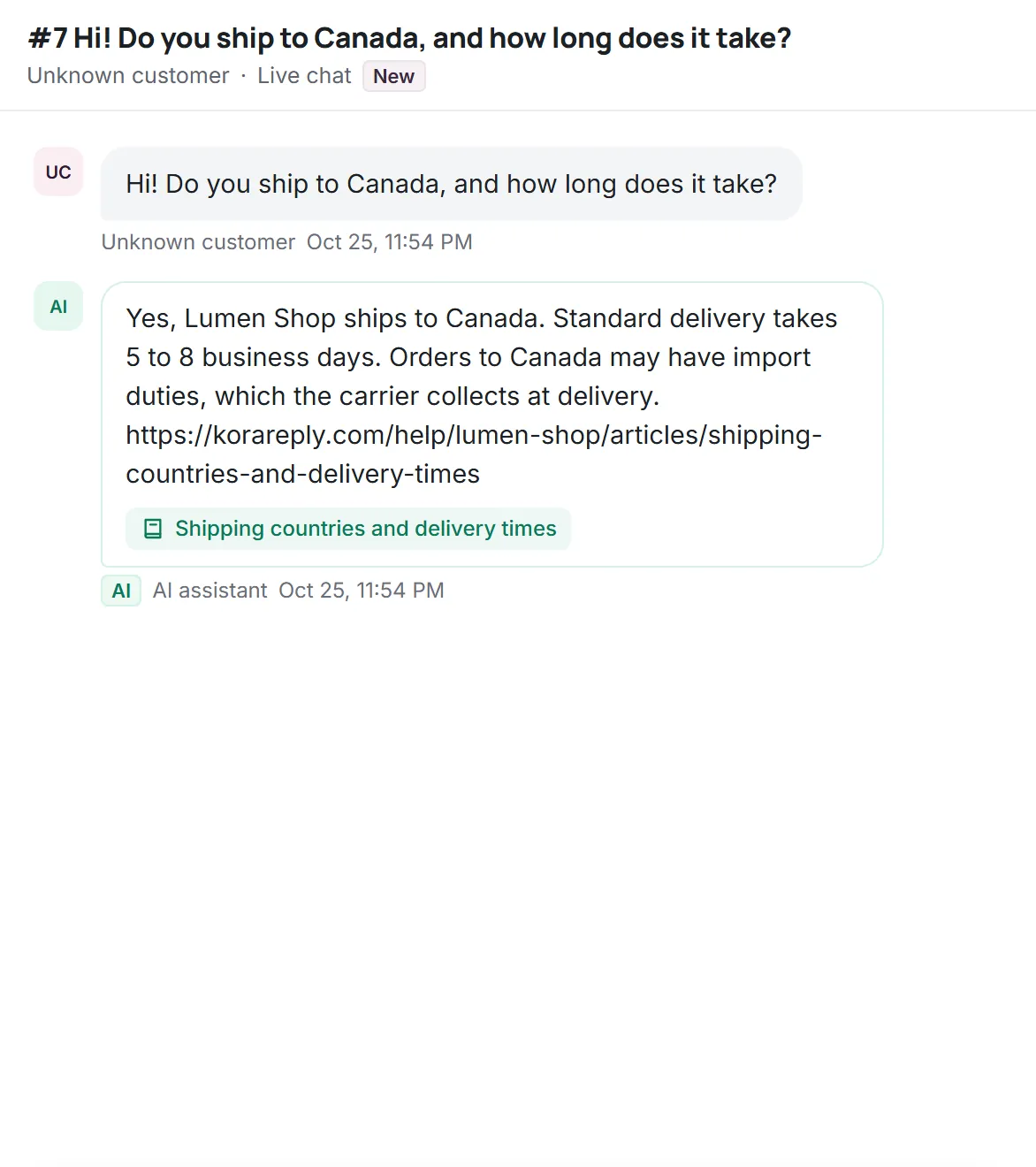
In a small company, customer service often grows by accident. The founder answers emails, then a second person helps, then someone sets up a chat widget, and suddenly there are four people, three channels and no shared way of working. Customer service management is the deliberate version of that story: deciding who does what, what you promise customers and which tools hold it together.
What customer service management is
Customer service management (sometimes shortened to CSM) covers everything involved in running support: staffing, workflows, service levels, quality, tools and the feedback that flows back into the business. It overlaps with two other terms that are worth separating:
| Term | Main focus | Question it answers |
|---|---|---|
| Customer service management | Running the support function | Does every request get a correct answer on time? |
| Customer relationship management (CRM) | Accounts, contacts and sales pipeline | Who are our customers and what might they buy? |
| Customer experience management (CX) | Every touchpoint across the customer journey | How does it feel to be our customer overall? |
For a small team, customer service management is the part you control directly, and the part customers notice fastest when it goes wrong.
The three pillars: people, process and tools
Most support problems trace back to one of three causes. Either nobody owned the request (people), nobody agreed how to handle it (process), or the information was in the wrong place (tools). Good customer service management keeps all three in balance. A great tool cannot fix unclear ownership, and a great team struggles with a tool that hides history.
People: roles in a small support team
Even with two or three people, naming a few roles prevents most dropped balls. One person can hold several:
- Daily triage owner. Checks the unassigned queue at agreed times, sets priority and assigns. Rotate it weekly so knowledge spreads.
- Escalation contact. The person who decides on exceptions: refunds outside policy, compensation, unusual requests.
- Knowledge base owner. Makes sure repeated questions become articles and that articles stay current.
- Specialists for billing or technical questions, who receive tickets by reassignment with notes, never by forwarded email.
Write down holiday and sick cover too. In a small team, one absence can halve capacity; the plan should say who checks whose queue.
Process: the promises you make
Process is simply the set of agreements that make the team predictable. The essential ones fit on one page:
- Response targets by priority, measured in business hours. For example: urgent within one hour, normal within one business day. Set them where you can meet them, then tighten. See SLA targets for how this works in practice.
- What counts as urgent. Outages, payment failures and security issues, not "the customer used capital letters".
- Authority limits. What any teammate can approve on their own (for example a re-shipment), and what needs the escalation contact.
- A short tone guide. How you greet, how you apologise, how you sign off. Our article on customer service emails is a good starting point.
- Handoff rules between teammates, and between an AI agent and people: always with a summary of what was asked and tried.
- When a ticket is resolved, and what happens when a customer replies afterwards.
Writing a good escalation note
Escalations go wrong when the person receiving them has to start from scratch. A useful internal note answers four questions in a few lines: what the customer wants, what has been tried, what you recommend and by when a decision is needed. It takes a minute to write and saves the customer from repeating their story to a second person.
A weekly operating rhythm
Small teams do not need many meetings. A light, regular rhythm is enough:
- Daily, 10 minutes: review overdue and due-soon tickets, reassign where someone is overloaded.
- Weekly, 30 minutes: look at volume by topic, the slowest tickets and any low satisfaction scores. Pick one improvement: a new article, a new saved reply or a process fix.
- Monthly: review targets, the knowledge base's most-viewed articles and anything customers keep asking for that the product does not do. Share that list with whoever makes product decisions.
Tools: what the stack needs
The tool landscape uses many overlapping names: customer communication platform, CX platform, customer experience software, help desk. Underneath, a small team needs a short list of capabilities:
- A shared inbox that brings every channel into one queue with one history per customer.
- Tickets with status, priority, owner, internal notes and an activity log.
- Response targets on your business hours, with an overdue view.
- Saved replies for consistent, fast answers.
- A public knowledge base that customers and teammates both use.
- Optionally, an AI agent that answers repeated questions from the knowledge base and hands off with a summary.
A CRM is useful when sales relationships are long and complex, but it is not a substitute for a help desk. The help desk guide explains how to choose one, and the ticketing system guide goes deeper into ticket structure.
Customer service metrics for a small team
Pick a handful of numbers and look at them every week, always as a trend against your own past results:
- Volume: new conversations per week, by channel and by topic.
- First reply time in business hours, against target.
- Overdue count: the single best early warning.
- Reopen rate: resolved tickets that the customer reopened, a sign of incomplete answers.
- Satisfaction: a CSAT score after resolution, read together with the comments.
If you use an AI agent, add its handoff rate and reasons. Each frequent reason is a missing or unclear article.
Hiring and onboarding a support teammate
The first support hire shapes the team's habits for years, so it is worth preparing. Look for clear writing, patience with confused customers and curiosity about the product; product knowledge can be taught, tone is harder to teach. A practical written exercise, such as answering three real (anonymised) tickets, tells you more than an interview question about customer service.
A simple onboarding plan for the first two weeks:
- Days 1 to 3: read the knowledge base end to end and use the product as a customer would.
- Days 4 to 5: shadow the triage owner and draft replies that a colleague reviews before sending.
- Week 2: own a share of normal-priority tickets, with internal notes for anything uncertain.
- End of week 2: write or improve two knowledge base articles based on what confused them. New eyes find gaps the team no longer sees.
From customer support to customer experience
Customer experience management looks beyond support at the whole journey: marketing promises, onboarding, billing, delivery. A support team sees the consequences of every gap in that journey first. The most valuable thing customer service management can add to the wider business is a steady, honest feedback loop: the top reasons customers contact you, which of them are avoidable, and what would remove them. Even a short monthly note with the top five avoidable contact reasons can change product and policy decisions.
When to add people, automation or AI
Before hiring, ask whether the extra volume is avoidable. If many tickets ask the same thing, an article, a clearer email or a product fix removes them for good. Automation and AI help next: customer service automation covers auto-replies, rules and saved replies, and the AI customer service guide covers AI agents. Add a person when targets slip for several weeks even though repeated questions are already handled, or when one person holds knowledge nobody else has.
Quality reviews without a QA team
Large contact centers employ quality analysts. A small team can get most of the benefit with a light routine: once a week, each person picks two resolved tickets handled by someone else and reads them against a short checklist. Was the first reply on time? Was the answer correct and complete? Did the tone match the guide? Did the customer have to repeat anything? Was there an article or saved reply that should have been used, or written?
Share findings as suggestions, not scores, and turn repeated issues into fixes: a clearer article, a new saved reply or a process change. If you use an AI agent, include a few of its conversations in the same review, so its answers are held to the same standard as everyone else's.
Common customer service management pitfalls
- Measuring speed only. Fast but wrong answers create reopens and unhappy customers. Pair speed with reopen rate and satisfaction.
- Heroes instead of systems. One person who knows everything is a risk. Move what they know into articles and saved replies.
- Too many tools. Every separate app is another place history can hide.
- Targets nobody believes. Unrealistic targets are ignored. Realistic ones get met and then improved.
- Feedback that goes nowhere. If customer feedback never reaches product decisions, the same tickets keep coming.
Kora Reply is built for exactly this kind of small team: one shared inbox for email, live chat and WhatsApp, tickets with response targets, saved replies, a public knowledge base and an AI agent that hands off with a summary. You can start on the Free plan and compare it with other tools on our alternatives page.
Frequently asked questions
Customer service management is organising the people, processes and tools of a support function so that every customer request gets a correct answer within a time you can promise.
A CRM is organised around accounts, contacts and sales. Customer service management is organised around requests and service levels: who handles each request and whether it is answered on time.
Weekly volume by topic, first reply time against target, the overdue count, reopen rate and a CSAT score after resolution, always compared with your own past results.
When response targets slip for several weeks even after repeated questions are covered by articles, saved replies or automation, or when critical knowledge sits with only one person.
A shared inbox for every channel, tickets with status, priority and owner, response targets, saved replies and a public knowledge base, optionally with an AI agent that hands off with a summary.
Run your support desk from one calm inbox
Kora Reply gives a small team a shared inbox, tickets with response targets, a public knowledge base and an AI agent that hands off with a summary. The Free plan needs no card.