What is a knowledge base? How to build one customers actually use
A knowledge base is an organised, searchable collection of answers to the questions your customers and teammates ask. This guide shows how to decide what to write first, how to structure each article and how to keep the whole thing accurate as your product changes.
On this page
Articles your customers and the AI share
Write articles in categories, keep drafts private, and publish to a help center that customers search and the AI agent answers from.
See the knowledge base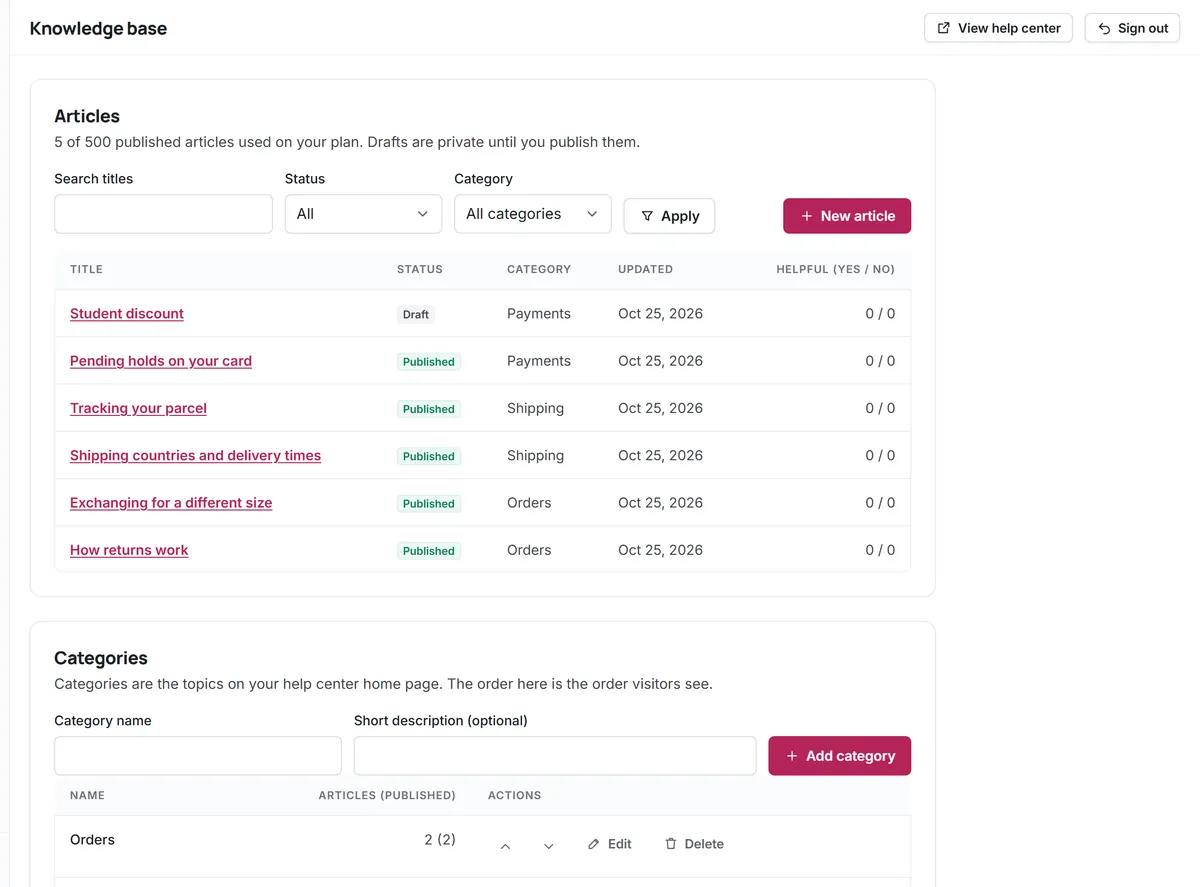
Every support team already has a knowledge base. It is just scattered: in old email replies, in one teammate's head, in a document nobody can find. Writing it down in one searchable place is one of the highest-return things a small team can do, because each article keeps answering questions long after it was written.
What is a knowledge base?
A knowledge base (sometimes written knowledgebase) is a structured library of help content: how-to guides, policies, troubleshooting steps and answers to common questions. People usually mean one of three things:
- A customer-facing help center, public help docs that customers search before contacting you.
- An internal knowledge base for the team: procedures, edge cases and the reasoning behind policies.
- A wiki knowledge base, where anyone in the company can edit pages. Flexible, but harder to keep consistent.
You may also see the term knowledge base expert system. That comes from an older branch of AI, where a set of encoded rules (the knowledge base) was used by an inference engine to reach conclusions. Modern AI agents work differently, but the idea survives: an AI can only be as good as the knowledge it is given. This guide focuses on the customer-facing kind, since that is what most small teams build first.
Why a knowledge base matters for a small team
- Customers get answers at any hour. Many people prefer to look something up rather than wait for a reply.
- Fewer repeated tickets. Every common question that customers answer themselves is time your team gets back.
- Consistent answers. When the policy lives in one article, every teammate quotes the same version.
- Faster onboarding. A new teammate learns your product from the same articles customers read.
- A foundation for AI. An AI agent that answers from your articles is only as reliable as those articles.
Decide what to write first
The most common mistake is to start with a table of contents and try to document everything. Start with demand instead:
- Export or skim the last month of tickets.
- Group them by question, not by wording. "Where is my parcel" and "has my order shipped" are the same question.
- Sort the groups by how often they appear.
- Write the top ten as articles this week. Use the exact words customers used in the title.
- From then on, whenever a teammate answers a question for the second time, they write or update an article.
This keeps the knowledge base small, useful and driven by what customers actually ask. Your saved replies are a good source too: a reply you send often is an article waiting to be published.
Structure and categories
Keep the structure shallow. Five to eight categories named after customer goals ("Orders and delivery", "Billing", "Your account") work better than categories named after your internal departments. Each article should live in one category; if it seems to belong in two, it probably covers two questions and should be split.
| Category | Example articles |
|---|---|
| Getting started | Create an account, first steps, system requirements |
| Orders and delivery | Shipping regions, delivery times, tracking an order |
| Returns and refunds | Return policy, how to send an item back, refund timing |
| Billing | Payment methods, invoices, changing your plan |
| Your account | Reset your password, change your email, delete your account |
| Troubleshooting | Error messages, known issues and workarounds |
Anatomy of a knowledge base article
A good knowledge base article answers one question, completely, in as few words as possible. A structure that works for most articles:
- A title phrased like the question. "How do I change my delivery address?" beats "Address management".
- The short answer first. One or two sentences that solve it for most readers.
- Numbered steps for anything with more than one action, one action per step.
- Exceptions and limits, stated plainly: what does not work, and what to do instead.
- A way forward: a related article, or how to contact the team if the article did not help.
Knowledge base examples by type of business
What goes into a knowledge base depends on what customers struggle with. Some typical starting sets:
- Online store: shipping regions and times, tracking an order, changing an address after ordering, returns and refunds, sizing, payment methods, damaged items.
- Software product: signing up, inviting teammates, resetting a password, connecting an integration, billing and invoices, known issues, exporting data.
- Service business: booking and rescheduling, what to prepare before an appointment, cancellation policy, opening hours and locations, payment and deposits.
- Internal IT or HR desk: getting access to tools, setting up a new laptop, VPN problems, leave requests, expense claims, who to contact for what.
In every case, the articles that matter most are the ones customers ask about most, which is why the ticket-based approach above works better than a brainstormed list. For internal desks, see the IT help desk page.
Knowledge base best practices
- One question per article. Long articles that cover everything are hard to search and hard for AI to quote accurately.
- Use customer vocabulary. If customers say "cancel", do not title the article "subscription termination".
- Show the date. A visible "updated" date helps readers trust the content.
- Link between articles where one question naturally leads to another.
- Ask "Was this helpful?" and read the "no" answers every week. They are your edit list.
- Make search the main door. A visible search box at the top of the help center does more than a perfect category tree.
- Keep drafts private. Unfinished articles should never be visible to customers, or to an AI agent.
Accessible help content
Help content should work for everyone, including people using screen readers, keyboard navigation or high zoom. The international reference is the W3C's Web Content Accessibility Guidelines (WCAG overview). For articles, the practical habits are simple: use real headings in order, describe images in alt text, never rely on colour alone, make link text meaningful ("see the return policy" rather than "click here") and keep text contrast high.
Keeping your knowledge base current
An outdated article is worse than none, because customers trust it. Three habits prevent decay:
- Every article has an owner, the person who knows when it needs to change.
- Product changes include article changes. Add "update help articles" to the checklist for every release or policy change.
- A short monthly review of the most-viewed articles and those with the most "not helpful" votes.
Retire articles that no longer apply instead of leaving them with a warning at the top. If customers might still land on the old address, point it to the closest current article.
A simple draft and review workflow
Even a two-person team benefits from a second pair of eyes. Write new articles as drafts, ask a teammate to follow the steps exactly as written, and publish only when they succeed without asking a question. When a policy changes, update the article first and then the saved replies that quote it, so customers, teammates and any AI agent all see the new version at the same time. Keep a short note at the bottom of each article's internal record saying what changed and why; it saves a lot of guesswork six months later.
Measuring whether your knowledge base works
A knowledge base can look busy and still fail customers. These signals show whether it is doing its job:
- Searches with no results. Each one is a question you have not answered yet, in the customer's own words.
- "Not helpful" votes per article. Rewrite the worst few every month, starting with the most viewed.
- Tickets after an article view. If customers read an article and then contact you about the same thing, the article is missing a step or an exception.
- Ticket volume by topic. After you publish a strong article on a topic, tickets about it should fall over the following weeks.
- AI handoff reasons, if you use an AI agent. Frequent reasons point straight at gaps in the content.
Keep the measurement light: a short monthly review of these five signals is enough for a small team, and it keeps the knowledge base growing in the direction customers actually need.
Your knowledge base and AI
If you plan to use AI in support, the knowledge base becomes even more important. An AI agent that answers from your articles will repeat exactly what they say, including outdated policies. The upside is that fixing one article fixes every future AI answer on that topic. The AI customer service guide covers grounding, handoffs and a rollout plan in detail, and the self-service portal guide explains how articles, search and contact options fit together for customers.
Creating a knowledge base in Kora Reply
Kora Reply includes a public knowledge base on every plan. You write articles in categories, keep drafts private until they are ready, and publish them to a help center with search and a "Was this helpful?" button. The same published articles are what the AI agent answers from, so there is one source of truth for customers, teammates and AI. The Free plan includes 20 published articles, Starter 500 and Team 2,000. To get started, create a workspace and write your top ten.
Frequently asked questions
A knowledge base is an organised, searchable library of help content, such as how-to guides, policies and troubleshooting steps, that customers or teammates use to find answers without asking someone.
Your ten most common customer questions from the last month of tickets, each written as its own article with the question as the title and the short answer first.
As short as it can be while answering one question completely. Most articles need a short answer, a few numbered steps and any exceptions.
An FAQ page is a single list of short answers. A knowledge base is a structured collection of full articles with categories and search, and it scales far better as questions grow.
Update an article whenever the product or policy it describes changes, and review the most-viewed and least-helpful articles once a month.
Run your support desk from one calm inbox
Kora Reply gives a small team a shared inbox, tickets with response targets, a public knowledge base and an AI agent that hands off with a summary. The Free plan needs no card.