Self service portal: how to help customers help themselves
A self service portal is the place where customers can find answers, follow steps and, when they still need help, reach your team without starting over. This guide explains what a good portal includes, how to design it and how to tell whether it is working.
On this page
A public help center out of the box
Every Kora Reply workspace gets a help center with search, topics and recently updated articles, on your own link.
See the help center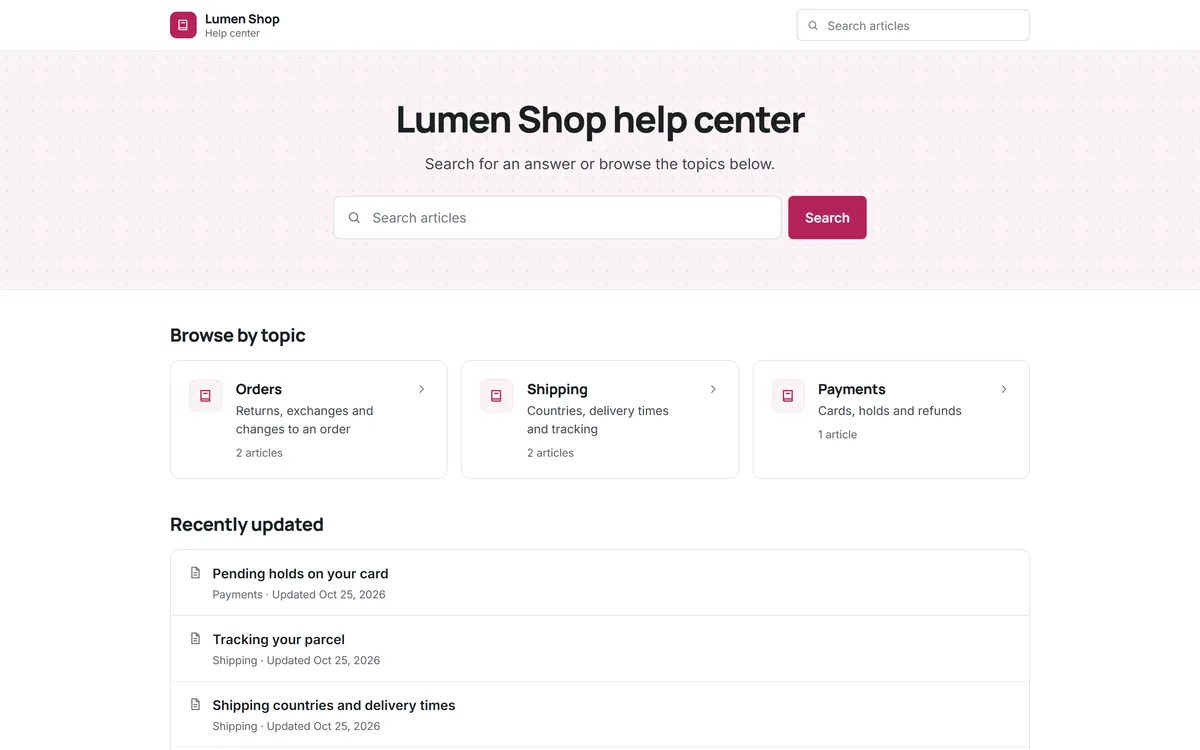
Customers do not wake up wanting to contact support. They want their problem solved, and if the answer is one search away, many would rather find it themselves than write a message and wait. Customer self service is about making that possible, and making the handover to a person smooth when it is not.
What a self-service portal is
A self-service portal is a website (or a section of your site or app) where customers can solve common problems on their own. At minimum it offers searchable help articles. Many portals add more: a way to submit a request, an AI assistant that answers from the articles, community forums, or a page where logged-in customers see their past requests. The word portal suggests something big, but for a small team a clear help center with search and a visible contact option already does most of the job.
Self service portal software is the tool that runs it: it hosts the articles, provides search, collects feedback on each article and passes unresolved questions to your team.
Kinds of customer self-service
| Form | What it does | Good fit when |
|---|---|---|
| Knowledge base / help center | Searchable articles, guides and policies | Almost always: the foundation of every other form |
| AI assistant | Answers questions in chat using your articles | Customers ask in their own words and articles exist |
| Customer account portal | Logged-in view of orders, plans or past requests | Customers often ask about the status of something |
| Community forum | Customers answer each other | A large, engaged user base |
| Self service IVR | Phone menus that resolve simple requests | A phone-heavy support line |
Employee self-service follows the same principles: an internal portal where staff look up IT or HR answers before raising a request. If that is your use case, see the IT help desk page.
Self-service portal benefits
- Answers around the clock, without anyone on shift.
- Fewer repeated questions reaching the team, which leaves time for the hard ones.
- Faster resolution for customers who can follow steps immediately instead of waiting for a reply.
- Consistent information, because policy lives in one place.
- Better tickets: customers who contact you after reading an article tend to describe their problem more precisely.
- A clear signal of what is confusing: searches with no results show exactly which answers are missing.
What a good self-service portal includes
- A search box at the top, tolerant of typos and different wording.
- The most common answers on the front page, chosen from real ticket data, not guesses.
- A small number of categories named after customer goals.
- Articles that answer one question each, with the short answer first. Our knowledge base guide covers how to write them.
- "Was this helpful?" on every article, so you know which ones fail.
- A visible way to contact the team on every page, by chat, email or WhatsApp.
- Your brand: your name, colors and address, so customers know they are in the right place.
Designing the self-service flow
Think of the portal as a path with three steps: search, read, and if needed, ask. Each step should hand context to the next.
- Search to article. Results should show article titles phrased as questions, so customers recognise their problem quickly.
- Article to answer. Steps, screenshots where they help, and exceptions stated plainly.
- Article to person. If the article did not help, the contact option should carry what the customer already tried. An AI assistant can do this naturally: it answers from the articles and, when it cannot help, hands the conversation to your team with a summary.
Passing context to the team
The moment a customer gives up on self-service is the moment your team has the most information about what went wrong. Capture it. A good handover includes which articles the customer viewed, what they searched for and, if an AI assistant was involved, what it already answered. With that context, the first human reply can skip the basics and go straight to the part the articles did not cover. Over time, those handovers also tell you exactly which articles need rewriting.
Never hide the way to a person
It is tempting to bury the contact option to push more people into self-service. It backfires. Customers who cannot find a way to reach a person get frustrated, and frustrated customers are the ones who leave. A good portal makes self-service the easy option, not the only one. Keep chat, email or WhatsApp one click away, and let the quality of your articles do the deflecting.
Writing content for self-service
Self-service content is read in a hurry, often on a phone, by someone who is already a little frustrated. A few writing rules help:
- Lead with the answer. The first sentence should solve the problem for most readers; details come after.
- One action per step, numbered, with the exact button or menu names customers will see.
- Plain words. Use the customer's vocabulary, not internal names for features or teams.
- Say what happens next. "You will receive a confirmation email within a few minutes" prevents a follow-up question.
- End with a way forward: a related article, or a link to chat with the team.
The knowledge base guide includes a full article structure you can copy.
Measuring self-service
- Searches with no results: the most direct list of missing articles.
- Helpful and not-helpful votes per article.
- Contact after reading: how often customers open a conversation right after viewing an article. A high rate on one article means it does not answer the question.
- Ticket volume per topic before and after publishing an article on it.
- AI handoff reasons, if you use an AI assistant: each one points at a gap in the content.
Self-service mistakes to avoid
- Launching with too little content. A portal with five thin articles teaches customers that searching is pointless. Cover your top questions properly before you promote it.
- Copying internal documents as they are. Internal notes assume knowledge customers do not have. Rewrite them for the reader.
- Letting articles go stale. One wrong price or outdated step damages trust in every other article.
- Measuring deflection only. Fewer tickets is good only if customers actually solved their problem. Watch satisfaction and repeat contacts too.
- Separate tools that do not talk. If the help center, the chat and the inbox are three products, context gets lost at every handover.
Choosing self-service portal software
Most help desks include a portal or help center, so the main decision is usually which help desk to use. Questions worth asking:
- Is the help center included on the plan you would buy, or only on higher tiers? (Zendesk's entry Support Team plan, for example, does not include a help center; it starts on Suite Team, per zendesk.com/pricing, checked Oct 2026.)
- How many articles can you publish, and how many help center sites?
- Can drafts stay private until they are ready?
- Does search handle typos and partial words?
- Can an AI assistant answer from the same articles, and what does it cost per conversation?
- Can customers reach your team from every page, and does that conversation land in the same inbox?
The alternatives hub compares these points across six popular tools using their official pricing pages.
A two-week launch plan
- Days 1 to 2: pull the top questions from last month's tickets.
- Days 3 to 7: write one article per question; have a teammate review each.
- Day 8: publish, and link the help center from your website footer, order emails and auto-replies.
- Day 9: add the chat widget on the help center so contact is one click away.
- Days 10 to 14: read every no-result search and not-helpful vote; fix or add articles daily.
Self-service by type of business
The shape of a good portal depends on what customers come for. An online store's portal is dominated by delivery, returns and payment questions, so order-related articles and a quick path to a person for anything involving money matter most. A software company's portal leans on setup guides, troubleshooting and billing, and benefits from articles linked directly from the product's own screens. A service business, such as a clinic or an agency, needs booking, cancellation and preparation information, with contact details always visible. An internal portal for employees focuses on access requests and how-to guides, and works best when it is linked from the tools staff already use every day.
Whatever the business, start from the ticket data: the questions customers actually send decide what the portal should answer first.
Self-service with Kora Reply
In Kora Reply, the knowledge base publishes to a public help center for your workspace with search and helpful votes. The live chat widget and the AI agent answer from the same published articles, and any question the AI cannot answer lands in your shared inbox with a summary. That gives a small team a complete self-service loop on the Free plan. For the wider strategy behind it, read the AI customer service guide.
Frequently asked questions
A self service portal is a website or section of your site where customers find answers and solve common problems on their own, usually through searchable help articles, with a way to contact the team when they still need help.
Customers get answers at any hour, the team receives fewer repeated questions, information stays consistent, and searches with no results show exactly which answers are missing.
A knowledge base is the content. A self-service portal is the customer-facing experience around it, which can add search, an AI assistant, account pages and contact options.
No. Keep chat, email or messaging one click away. Customers who cannot reach a person get frustrated, and good articles reduce contact volume on their own.
Track searches with no results, helpful votes per article, how often customers contact you right after reading an article, and ticket volume per topic before and after publishing.
Run your support desk from one calm inbox
Kora Reply gives a small team a shared inbox, tickets with response targets, a public knowledge base and an AI agent that hands off with a summary. The Free plan needs no card.